Key Takeaways
- Sales quote automation replaces manual assembly with rules-driven software that pulls pricing, product data, and customer terms automatically.
- Inside sales teams at distributors and wholesalers benefit most — they carry high quote volumes with tight turnaround expectations.
- A complete automated quoting process spans five stages: request capture, configuration, pricing, approval routing, and delivery.
- ERP integration determines whether automated quotes are accurate — without live data, automation produces fast but wrong quotes.
- Automation handles assembly work — reps still own deal strategy, customer relationships, and exceptions.
What Is Sales Quote Automation?
Sales quote automation is the use of software rules, pricing logic, and workflow triggers to generate, route, and deliver sales quotes with minimal manual effort from a rep.
Instead of a rep pulling prices from a spreadsheet, cross-referencing a price book, and manually formatting a document, the system handles that assembly. It applies predefined rules for product configuration, pricing tiers, discounts, and approval thresholds — then produces an accurate, on-brand quote ready to send.
Three terms often get used interchangeably in this space — but they mean different things:
- CPQ (Configure, Price, Quote) is the software category — the tool that makes automation possible
- A sales quote is the output document delivered to the buyer
- Quote automation is the process that connects the rep's request to the finished quote without manual assembly steps
Gartner defines CPQ applications as software that enables sales organizations to automate and optimize quote creation and order capture. For inside sales teams specifically, the value shows up in quote turnaround speed, pricing accuracy, and the volume of deals a rep can work simultaneously.
Why Inside Sales Teams Need Quote Automation
Inside sales reps don't work one deal at a time. They're fielding calls and emails throughout the day, building quotes for complex product combinations — all while buyers expect a response within hours. That pressure compounds fast.
According to Salesforce's 2026 State of Sales report, sales reps spend 18% of their average workweek creating quotes — and 60% of their total time on non-selling tasks. For a distributor managing dozens of SKUs across multiple customer pricing agreements, that ratio isn't sustainable at volume.
What Goes Wrong Without Automation
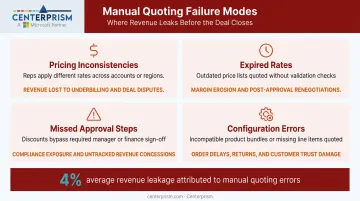
Manual quoting at scale creates predictable, recurring failures:
- Pricing inconsistencies — different reps apply different discount rates to the same customer
- Expired rates — reps pull from outdated spreadsheets after contract terms have changed
- Missed approval steps — high-value deals go out without required manager sign-off
- Configuration errors — incompatible product combinations get quoted, creating downstream fulfillment problems
Each of these has a real cost. Nucleus Research's 2025 CPQ Technology Value Matrix found that legacy CPQ systems are responsible for leaking 4% of revenue — a figure that reflects what broken quoting processes cost in margin erosion and rework. According to the National Association of Wholesaler-Distributors, transaction-level pricing overrides in distributor environments regularly reach 50% or more when pricing decisions are made quote by quote without systematic controls.
The Speed Problem
A buyer comparing three suppliers moves forward with the first credible, accurate quote they receive. Thomasnet's research on industrial buyer behavior shows industrial buyers expect a response in less than 24 hours. That window closes fast when a rep is manually assembling a complex quote.
Automation closes the speed gap without sacrificing accuracy — because the pricing rules and configuration logic are embedded in the system, not held in a rep's head or a shared spreadsheet.
Pricing Compliance at Scale
Manual quoting creates a compliance risk that's easy to underestimate. In high-volume inside sales environments, reps make dozens of small pricing decisions daily. Without centralized rules, unauthorized margin concessions slip through — not through malice, but through the absence of guardrails.
Automation enforces compliance by design. The key controls that live inside an automated quoting system include:
- Discount thresholds — caps that prevent reps from exceeding authorized margin concessions
- Approval triggers — automatic escalation when deal size or discount level requires manager sign-off
- Contract-specific rates — customer pricing agreements applied automatically, not recalled from memory
No rep can send a quote that violates those rules. The system won't let the process advance until every condition is met.
How Sales Quote Automation Works
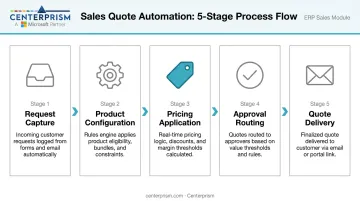
The end-to-end flow follows five stages: a rep receives a request, the system captures inputs, applies product and pricing logic, routes the draft through any required approvals, and delivers a finalized quote to the buyer. When data is centralized and rules are predefined, the entire process can complete in minutes.
Three data sources feed the process and must be current:
- Product catalog with configuration rules and valid combinations
- Pricing engine with customer-specific agreements, volume tiers, and promotional adjustments
- CRM/ERP data with account details, order history, and contract terms
Here's how each stage plays out in practice:
| Stage | What Happens |
|---|---|
| Request Capture | Rep enters requirements; system pre-populates from account data |
| Product Configuration | Rules engine validates combinations and flags incompatible options |
| Pricing Application | Live ERP pulls contract rates, volume tiers, and active promotions |
| Approval Routing | Quotes over defined thresholds route automatically to the right approver |
| Quote Delivery | Formatted document sent to buyer; CRM opportunity updated automatically |
Step 1: Request Capture
The process begins when a rep enters the customer's requirements into the quoting system. In modern setups, this can include parsing requests from email or intake forms. Systems connected to ERP can pre-populate fields from existing customer account data, reducing manual entry and the errors that come with it.
The quality of this input step determines everything downstream. Bad data here — wrong account tier, outdated ship-to address, missing product specs — flows directly into a quote that can't be fulfilled or has to be reissued.
Step 2: Product Configuration
The system applies configuration rules to ensure the rep is building a valid, fulfillable product combination. This matters most for distributors selling customizable or technically complex items where incompatible configurations are a routine source of error.
A rule-based product configurator — like the Sales Configurator in Centerprism's Sales Management system — automates this validation. It guides order entry through a step-by-step process covering size, material, finish, add-on options, and custom characteristics, so reps don't need deep product expertise to produce a correct quote.
Step 3: Pricing Application
With configuration validated, the system pulls the correct pricing: list price, customer-specific contract rates, volume tier discounts, and any active promotional adjustments.
This is where ERP integration is most critical. Pricing pulled from a live, connected system reflects current contract terms. Pricing pulled from a static spreadsheet reflects terms as of the last time someone updated the file — which may have been months ago.
Step 4: Approval Routing
Quotes exceeding predefined thresholds — by discount depth, deal size, or product category — are automatically routed to the appropriate approver. This eliminates the manual follow-up chain where reps chase managers for sign-off via email or messaging apps.
Automated routing also creates an audit trail. Every approval decision is logged with a timestamp and approver identity, which matters for compliance reviews and pricing strategy analysis.
Step 5: Quote Delivery and Follow-Up
The approved quote is formatted and delivered to the buyer. After that, three things happen without any rep action:
- Automated follow-up triggers prompt re-engagement if no response arrives within a set window
- The quote is logged against the CRM opportunity record automatically
- Pipeline data stays current without additional manual entry
Key Features to Look For in Quote Automation Software
Not all quoting tools are built the same. For inside sales teams at distributors and wholesalers, these capabilities separate platforms that work at volume from ones that create new bottlenecks.
ERP and CRM Integration
This is the single most important capability. A live, two-way connection to the company's ERP and CRM ensures product availability, customer pricing agreements, and account history are always current when a quote is generated.
The type of integration determines data accuracy at the moment of quoting:
| Integration Type | How It Works | Risk |
|---|---|---|
| Native real-time sync | Data pulled directly from ERP at moment of quote | Minimal — always current |
| Batch export/import | Data synced on a schedule (hourly, daily) | Lag introduces outdated pricing and availability |
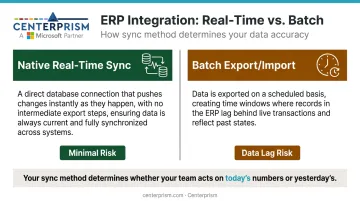
TechTarget notes that CPQ integration gives sales teams real-time data about product availability, lead times, and historical pricing. Without that live connection, you're automating a process built on stale data. RSM describes disconnected CRM and ERP workflows as a source of manual swivel-chairing in CPQ projects — reps manually transferring data between systems, adding minutes per quote across hundreds of transactions daily.
Centerprism's platform connects directly to the existing Microsoft Dynamics GP database with no separate database layer required, which is what enables same-day deployment for the analytics component.
Rule-Based Product Configurator
Distributors and wholesalers selling custom or configurable products need a configurator that enforces valid combinations at the point of quoting — preventing reps from building quotes for products that cannot be manufactured or fulfilled as specified.
This capability separates purpose-built sales management platforms from generic document generation tools. A configurator built around industry-specific product logic catches incompatible selections before the quote reaches the customer.
Customer-Specific Pricing Engine
The software must support multiple pricing tiers, volume discount structures, and contract-specific rates by customer account. Inside sales teams managing large customer bases cannot manually track which rate applies to which buyer.
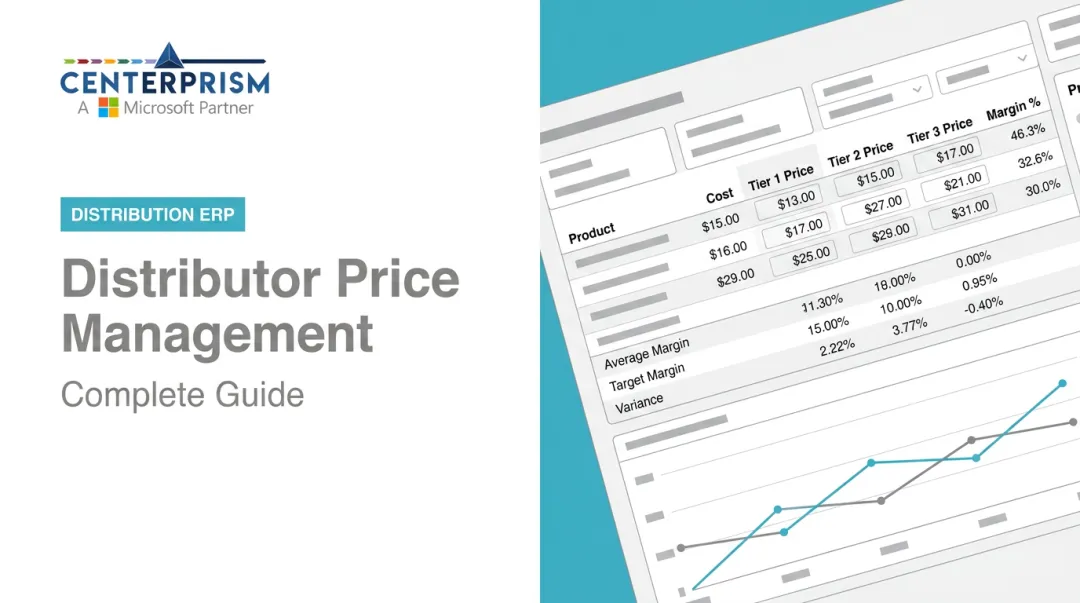
Centerprism addresses this directly. Its Price Management module centralizes pricing rules, discounts, and promotions in one place. Price Memorization takes it further — storing customer-specific and historical rates so repeat transactions apply the right price automatically, without rep intervention.
Approval Workflow Automation
Configurable thresholds that trigger manager review based on deal size, discount depth, or product category reduce approval cycle time without sacrificing pricing discipline. At minimum, look for:
- Mobile notifications for pending approvals
- Threshold rules by deal size, discount percentage, or product category
- A clear audit trail for every approval action
Analytics and Quote Tracking
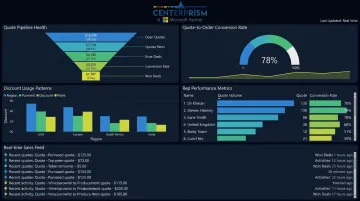
The ability to monitor quote conversion rates, average time-to-close by rep, discount usage patterns, and outstanding pipeline gives managers the visibility to coach reps and spot pricing strategy gaps.
Real-time analytics dashboards — rather than periodic spreadsheet exports — are what enable this. Centerprism's PrismView analytics tool surfaces this kind of data directly from the connected database, without requiring a separate BI layer.
Common Pitfalls and When Automation Falls Short
Automating a Broken Process
The most common implementation failure: teams deploy quoting software without first centralizing and cleaning up their product catalog, pricing rules, and customer account data. The result is the same inaccurate quotes, just produced faster.
Automation amplifies whatever data quality already exists — it doesn't correct it. A data readiness audit should come before any implementation begins.
The 2026 Salesforce State of Sales report found that 46% of sales professionals with agents say data quality issues directly hurt their sales — a signal that data problems don't disappear when you add automation on top.
Deals That Don't Fit Automated Rules
Quote automation is not appropriate for every deal type:
- Highly negotiated, one-off contracts where pricing is determined through multi-round discussion
- Novel product configurations that fall outside existing rules
- Relationship-sensitive situations where the buyer expects a human-led, consultative process
Forcing non-standard deals through an automated workflow produces quotes that are technically generated but practically wrong.
Misunderstanding What Automation Replaces
A common misconception: automation eliminates rep judgment entirely. It doesn't. Effective automation removes the administrative assembly work: pulling prices, formatting documents, chasing approvals. Reps remain responsible for deal strategy, customer communication, and exception handling.
The difference in outcomes comes down to expectations:
- Teams expecting full hands-off automation are regularly disappointed when edge cases and rep judgment are still required
- Teams that treat automation as a productivity tool — one that clears admin work so reps can focus on selling — see stronger adoption and measurable results
Conclusion
Sales quote automation replaces the manual, error-prone assembly of quotes with a rules-driven process that is faster, more accurate, and enforces pricing compliance across the team.
The core decision point is simple: the value of automation is proportional to the quality of the underlying data and system integration. Teams that connect their ERP, product configurator, and pricing engine to a single platform, where data flows in real time, get accurate quotes at speed. Teams that bolt automation onto disconnected spreadsheet processes trade accuracy for speed — and eventually pay for it in rework, margin erosion, and customer disputes.
For inside sales teams at industrial distributors, wholesalers, and supply companies, the operational case is clear. Automation delivers on its promise when the data foundation is solid. That's the prerequisite worth evaluating before anything else.
Frequently Asked Questions
What is the difference between sales quote automation and CPQ software?
CPQ (Configure, Price, Quote) is the software category; sales quote automation is the process that CPQ tools enable. Not all quoting tools include full CPQ capabilities. Inside sales teams with complex product lines typically need the configuration and pricing logic that a true CPQ or ERP-integrated quoting module provides — not just a document generator.
How long does it take to implement sales quote automation?
Timelines depend on product catalog complexity, pricing rule structure, and integration requirements. ERP platforms with native quoting modules, like Centerprism for teams already running Microsoft Dynamics GP, can be operational the same day. Standalone CPQ tools integrated to a legacy ERP can take months.
Can sales quote automation handle custom or configured products?
Yes — when the system includes a rule-based product configurator that validates combinations at the point of quoting. Without this, reps building quotes for custom items still rely on manual checks, which reintroduces the configuration errors automation is designed to prevent.
What are the most common mistakes inside sales teams make when automating quotes?
Two mistakes dominate: deploying automation before cleaning up pricing and catalog data (producing fast but inaccurate quotes), and failing to train reps on exceptions that fall outside automated rules. Upfront data preparation and clear exception-handling protocols prevent both.
How does quote automation integrate with an ERP system?
Integration creates a live data connection between the quoting tool and the ERP's product, pricing, and customer account records. Require real-time sync, not batch updates — batch integrations introduce lag that causes quotes to reflect outdated pricing or availability, defeating the core accuracy benefit.
Does sales quote automation work for small and mid-size distributors, or is it only for large enterprises?
Automation is particularly valuable for smaller distributors, where a lean inside sales team handles high quote volume without the headcount to absorb manual work. Modern ERP platforms built for distributors, including Centerprism, often include quoting and configuration capabilities as part of the core platform rather than as a separate, expensive enterprise add-on.