The practical stakes are real. A standalone Warehouse Management System can run $150,000–$500,000 in first-year costs for a mid-market deployment, according to 2026 WMS pricing data from Made4net. Meanwhile, many ERP solutions start at $150/month for basic plans and cover far more than just the warehouse.
This article breaks down exactly what each system does, where they differ, and how to decide which one your distribution or wholesale operation actually needs.
Key Takeaways
- ERP manages your entire business — finance, sales, purchasing, inventory, and warehouse operations — from one platform.
- WMS is a specialized tool focused exclusively on physical inventory movement inside a warehouse.
- The core difference is scope: ERP gives business-wide visibility; WMS gives deep warehouse precision.
- Most SMB distributors don't need a standalone WMS — an ERP with built-in warehouse functionality is sufficient and far more cost-effective.
- A dedicated WMS is worth considering when warehouse complexity outgrows your ERP's built-in tools.
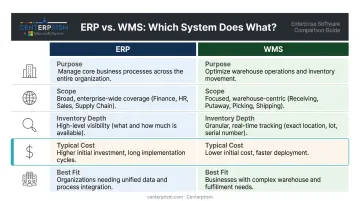
WMS vs. ERP: Quick Comparison
| Category | ERP | WMS |
|---|---|---|
| Primary Purpose | Business-wide planning and management | Warehouse execution and inventory movement optimization |
| Scope | Cross-departmental (finance, sales, purchasing, warehouse) | Warehouse operations only |
| Inventory Tracking Depth | High-level (total stock by location) | Granular (bin, lot, serial number, movement path) |
| Key Users | Finance, sales, operations, management | Warehouse managers, pickers, receiving staff |
| Core Features | Accounting, order management, CRM, inventory, purchasing, analytics | Receiving, put-away, bin tracking, pick-pack-ship, barcode scanning |
| Typical Cost Range | From ~$150/month (SaaS); $10K–$75K/year for SMBs | $1,500–$15,000/month (SaaS); up to $500K first-year for mid-market |
| Best Fit | SMB distributors, wholesalers, multi-department businesses | Large distribution centers, 3PLs, complex automated warehouses |
What Is ERP Software?
ERP (Enterprise Resource Planning) is an integrated software platform that centralizes and automates business processes across all departments — accounting, sales, purchasing, inventory, and warehouse management — in a single system of record.
For distributors and wholesalers, this matters because these businesses must manage fast-moving inventory alongside customer orders, vendor relationships, financials, and sales performance simultaneously. When those functions live in separate tools, data silos are inevitable.
Orders don't match inventory counts. Finance reconciles from stale exports. Sales doesn't know what's actually in stock. ERP eliminates that fragmentation.
Core ERP Modules for Distributors
A full-spectrum ERP built for distribution includes:
- Accounts receivable and payable — automated invoicing, payment application, and collections workflows
- Order management — tracks the full order lifecycle from quote to fulfillment
- Inventory management — real-time stock levels, replenishment triggers, multi-location visibility
- CRM — customer and sales data in one place, not a separate tool
- Purchasing management — vendor records, purchase orders, and procurement workflows
- Warehouse management — receiving, pick-pack-ship, bin locations, barcode scanning
- Reporting and analytics — live visibility into margins, trends, and sales performance
Platforms like Centerprism take this further by integrating real-time sales analytics (via their PrismView™ tool, which connects directly to the live database — no separate BI database required), automated receivables, and commission management. Because PrismView runs off the live database, distributors get current numbers without spreadsheet exports or scheduled refreshes.
Where ERP Fits in Daily Distribution Operations
ERP connects the workflows that cross department lines on every order:
- A sales rep enters a customer order → inventory updates instantly → warehouse receives the pick list → finance generates the invoice → collections tracks payment — all in one system.
This eliminates the manual handoffs, duplicate entries, and reconciliation errors that slow operations when those steps live in separate tools.
What Is a Warehouse Management System (WMS)?
A WMS is specialized software designed exclusively to manage and optimize the physical movement and storage of inventory within a warehouse, from the moment goods arrive to when orders ship out.
The core strength of WMS is granularity. Where ERP tells you how many units you have, WMS tells you exactly where each unit is: which bin it occupies, who touched it last, and the fastest path to retrieve it.
Key WMS Capabilities
- Receiving and put-away workflows with directed location assignment
- Bin/shelf/zone optimization based on pick frequency and item size
- Barcode scanning with timestamped movement logging
- Cross-docking for high-velocity items
- Wave, batch, and zone picking to maximize picker efficiency
- Shipping document generation and carrier integration
- Warehouse layout recommendations based on historical movement data
The Critical Limitation of Standalone WMS
WMS systems don't handle accounting, CRM, order management, or financial reporting. A standalone WMS requires integration with a separate ERP to function as part of a complete business operation. That integration adds licensing costs, ongoing maintenance, and the ongoing risk of data sync failures between two separate platforms.
Nucleus Research's 2023 WMS study found that 46% of organizations increased inventory accuracy within one year of WMS deployment, with an average improvement of 20%. Those results are meaningful, but they reflect a substantial investment in software, integration, and implementation resources.
Who Actually Needs a Standalone WMS
The businesses that genuinely justify dedicated WMS investment tend to share specific characteristics:
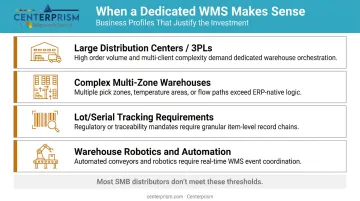
- Large distribution centers or 3PLs handling extremely high daily order volumes
- Warehouses with complex multi-zone layouts and automated picking systems
- Operations requiring granular lot/serial tracking — pharmaceutical, perishable food, regulated industries
- Businesses running warehouse robotics or conveyor/sortation systems
Souto Foods, a mid-market Hispanic food and beverage wholesaler serving 1,000+ grocers, deployed Made4net's WMS integrated with NetSuite ERP and achieved a 65% increase in cases-per-hour pick rates, 50% overall efficiency increase, and 95% inventory accuracy. Those numbers reflect a high-complexity, high-volume operation with the infrastructure to support dedicated WMS investment. For most SMB distributors, a well-configured ERP with strong inventory management capabilities covers the same ground without the added integration layer.
ERP vs. WMS: Key Differences That Matter for Distributors
Scope and Purpose
ERP covers business breadth; WMS covers warehouse depth.
- ERP answers: "What is our overall business position — revenue, margins, inventory value, order backlog?"
- WMS answers: "Where is each item, and how do we move it most efficiently?"
This distinction determines which system you actually need. If your core challenge is coordinating sales, finance, purchasing, and warehouse operations from one place, that's an ERP problem. If your warehouse operations are already well-integrated but picking accuracy and throughput are bottlenecks at scale, that's where WMS adds unique value.
Data Granularity
| Level | ERP Tracks | WMS Tracks |
|---|---|---|
| Inventory quantity | ✅ Units on hand, on order, allocated | ✅ Same |
| Location | ✅ By warehouse/site | ✅ By bin, shelf, zone |
| Movement history | ✅ Transaction-level | ✅ Every scan, operator, timestamp |
| Lot/serial tracking | ✅ Basic | ✅ Full traceability |
For most distributors with mid-sized, single-location warehouses, ERP-level tracking is entirely sufficient.
Integration Dependency and Cost
A standalone WMS cannot replace an ERP — it requires one. That integration layer isn't free. According to 2026 WMS cost data from CPCON, mid-market WMS ERP integration alone runs $25,000–$150,000, on top of the WMS software and implementation costs.
Compare that to a modern ERP with built-in warehouse management functionality. For SMB distributors, the total cost difference is substantial — and the operational complexity of maintaining two integrated systems rarely justifies itself unless warehouse operations are genuinely complex.
Where the Lines Blur
Modern ERP platforms — including Centerprism — include full warehouse management modules: barcode scanning, bin/shelf location tracking, pick-pack-ship workflows, and mobile picking via smartphone rather than dedicated handhelds. In practice, an ERP's built-in WMS module covers 80–90% of what a standalone WMS provides, without the added integration cost and maintenance burden.
Which Does Your Business Actually Need?
The right answer depends on warehouse complexity, order volume, number of locations, SKU count, and whether you use automation. Here's a practical framework:
Scenario-Based Guidance
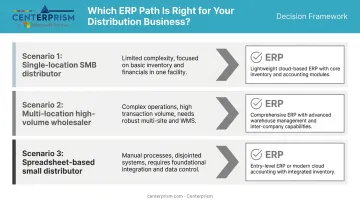
Single-location distributor, hundreds to a few thousand SKUs, standard pick-pack-ship: ERP with built-in warehouse management is the right fit. The cost and complexity of a standalone WMS simply isn't justified at this scale.
Multi-location wholesaler with high daily order volumes, complex routing, automated picking, or lot traceability requirements: Start with ERP, then evaluate adding a WMS module when specific operational gaps emerge. For most in this category, ERP handles it — but volume and complexity may eventually make a dedicated WMS worth considering.
Small distributor currently running on spreadsheets or disconnected tools: Start with ERP. The operational gains from replacing siloed tools with a unified platform will far outweigh anything WMS-specific at this stage — full stop.
A Real-World Example
Quality Material Handling, a wholesale distributor and manufacturer with 50–100 employees and $10M–$50M in revenue, replaced Sage 100, paper processes, and spreadsheets with Acumatica Cloud ERP. The result: month-end close time dropped 82% to 11 days, and reporting that previously took hours was reduced to 15 minutes. That's the operational lift most SMB distributors actually need — unified business management, not specialized warehouse software.
What Most SMB Distributors Actually Need
For most small-to-medium distributors and wholesalers, a full-spectrum ERP covers all the warehouse and business management functionality needed in one platform — without the overhead of a standalone WMS.
Centerprism is built for distributors and wholesalers on Microsoft Dynamics GP — with real-time analytics via PrismView™, automated receivables, and same-day implementation. To explore whether it fits your operation, call 1-800-814-6631 or visit centerprism.com.
Frequently Asked Questions
What are ERP systems in warehouse management?
ERP systems include warehouse management as a core module — covering inventory tracking, receiving, pick-pack-ship workflows, and bin locations — all integrated with financials, sales, and purchasing. Warehouse activity automatically updates financial records and order statuses without manual intervention.
What are the main types of ERP systems?
The three main deployment types are on-premises (installed on company servers), cloud-based/SaaS (hosted and accessed online), and industry-specific ERP (built for sectors like distribution, manufacturing, or retail). Cloud-based ERP suits most SMBs well — lower upfront costs and faster implementation make it the practical default.
Can ERP software replace a standalone WMS?
For most small-to-medium distributors and wholesalers, yes. A modern ERP with built-in warehouse management features covers the core functionality needed at a fraction of the cost. Standalone WMS becomes necessary only for large-scale operations with warehouse automation, multi-warehouse routing, or advanced lot traceability requirements.
Which is better for small and mid-sized distributors — WMS or ERP?
ERP is almost always the better starting point. It covers warehouse operations alongside financials, sales, and purchasing in one system — at significantly lower cost and complexity than deploying a standalone WMS that still requires a separate ERP to manage everything outside the warehouse.
How do WMS and ERP work together?
ERP handles business-level functions — orders, invoicing, financials, purchasing — while WMS manages real-time warehouse execution. They exchange data to keep records in sync, though integration requires setup, ongoing maintenance, and adds meaningful cost.
What is the cost difference between WMS and ERP software?
Standalone WMS mid-market implementations typically run $150,000–$500,000 in year one, including software, implementation, and ERP integration. Cloud ERP solutions, by contrast, typically cost SMBs $10,000–$75,000 annually — and include warehouse management built in, with no separate integration bill on top.