This article answers the question "what is an order management system in ERP?" and explains why the answer matters specifically for distribution businesses. You'll learn what OMS in ERP means, how the order lifecycle works inside an integrated system, which features matter most, and how to evaluate the right solution for your operation.
Key Takeaways
- An ERP-integrated OMS manages the full order lifecycle, from entry through invoicing and payment, in one connected system
- Unlike standalone tools, ERP order management shares a live database with inventory, finance, and customer data
- Real-time inventory visibility at order entry prevents overselling, stock-outs, and pricing errors
- Automated invoicing and collections shorten the order-to-cash cycle for distributors
- High-volume distributors get more from ERP-integrated OMS than standalone tools built for retail fulfillment
What Is an Order Management System in ERP?
An Order Management System (OMS) within an ERP is the module that tracks and manages the complete lifecycle of a customer order — from placement through fulfillment, invoicing, and final payment. In an ERP context, it's not a separate tool bolted on the side. It shares a single database with inventory, accounts receivable, pricing, and CRM data.
Standalone OMS vs. ERP-Integrated Order Management
The difference shows up in daily operations:
- Standalone OMS manages order workflows in isolation, requiring data to be passed to inventory, finance, or CRM systems through integrations or manual exports
- ERP-integrated OMS operates on shared data — when a sales rep creates an order, inventory is allocated, pricing rules are applied, and the customer's credit limit is checked simultaneously, with no duplicate entry
Microsoft's order-to-cash guidance defines this scope as everything from the moment a customer places an order until payment is received and settled against the invoice. That's the full boundary an ERP-integrated OMS owns. In practice, that spans more ground than most teams expect.
What "Order Management" Actually Covers
For distributors and wholesalers, that scope includes:
- Sales order creation and pricing validation
- Inventory allocation and backorder management
- Shipment scheduling and fulfillment coordination
- Invoice generation and payment application
- Returns, credits, and post-sale tracking
Who Benefits Most
Industrial distributors, consumer wholesalers, and rental supply companies are the clearest beneficiaries. These businesses handle high order volumes, repeat customers with negotiated pricing, and large accounts receivable balances. Those are precisely the conditions where manual processes fail first.
How Order Management Works Within an ERP System
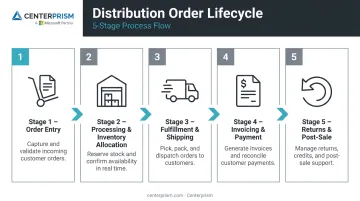
The order management process in a distribution ERP follows a structured lifecycle: order entry → processing and validation → fulfillment → invoicing and payment → post-sale service. Each step builds on the previous one using shared data.
Order Entry and Sales Order Creation
Orders can be entered directly by sales reps, imported through EDI feeds, or captured through customer-facing portals or e-commerce integrations. At the moment of entry, the system pulls the customer's account details, applicable pricing tier, and current product availability automatically — no manual lookups required.
For distributors selling configurable products, this step gets more complex. Centerprism's rule-based Sales Configurator walks order entry staff through a step-by-step Q&A to build custom products on the fly — selecting from attributes like size, material, finish, and add-ons — so the right SKU is identified accurately even across hundreds of configuration combinations.
Order Processing and Inventory Allocation
Once an order is entered, the ERP validates it against current inventory levels, customer credit limits, and applicable pricing rules. If inventory is available, it's allocated to that order immediately. If not, the system should trigger a replenishment alert or initiate a backordering workflow to keep fulfillment on track without manual intervention.
Fulfillment and Shipping
The ERP coordinates picking, packing, and shipping by generating warehouse fulfillment instructions, creating shipping documentation, and updating order status in real time. For multi-location distributors, this step often involves routing orders to the nearest or most cost-effective warehouse, a decision the system makes automatically based on predefined rules.
Invoicing, Payment, and Receivables
Once an order ships, the ERP generates the invoice automatically, applies the correct payment terms, and routes the transaction to accounts receivable. For wholesale distributors, the gap between order completion and payment receipt is one of the most direct drains on working capital.
Centerprism addresses this directly through its Integrated Receivables & Collections module, which includes:
- Customer Payment Portal: Lets customers pay invoices online through a self-service web app, keeping AR staff out of the loop
- Cash Receipts Dashboard: Simplifies payment application with integrated credit card processing
- Collection Management System: Automates reminders, batch email invoicing, escalation templates, and status tracking for overdue accounts
Returns, Exchanges, and Post-Sale Tracking
The order lifecycle doesn't end at shipment. An ERP with full order management should support return merchandise authorizations (RMAs), credit memos, and real-time order status visibility — so customers and sales reps know exactly where every order stands at any point.
Key Features of Order Management in an ERP
Not all ERP order management modules are equal. These are the capabilities that matter most for distributors:
- Multichannel order capture: Orders from sales reps, phone, email, EDI, and online channels flow into a single queue. For distributors managing hundreds of accounts, a fragmented intake process is where orders fall through the cracks.
- Real-time inventory visibility: When inventory and order management share the same system, reps can quote accurate availability and delivery dates without leaving the order screen — preventing overselling and the customer service calls that follow a missed commitment.
- Integrated CRM and customer profiles: Order history, pricing agreements, credit limits, and contacts all live in the same system used to process orders. Sales teams get the context to personalize service and spot upsell opportunities without switching applications.
- Automated invoicing and collections: Invoicing tied to order completion shortens the billing cycle. As Distribution Strategy Group noted in 2025, ERP and WMS form the operational hub for order-to-cash in distribution.
Centerprism's collections module takes that a step further — handling reminders, escalation messaging, and batch invoicing to reduce DSO (days sales outstanding) without adding headcount.
- Reporting and sales analytics: Built-in analytics give managers visibility into order volume trends, best-selling products, and profit margins by customer or product line — no spreadsheet exports needed.
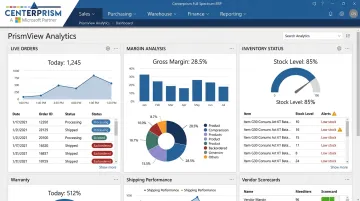
Centerprism's PrismView tool connects directly to the live database, so the data is current the moment you view it. It supports year-over-year comparisons, margin views by customer or item, salesperson rankings, and best-seller analysis — all in real time.
Benefits of ERP-Integrated Order Management for Distributors
Reduced Order Errors and Faster Processing
When order management shares live data with inventory, pricing, and customer accounts, manual entry errors drop significantly. Modern Distribution Management reports that system integration prevents manual and duplicate data entry, errors, and wasted time — and that nearly one-third of sales and sales-operations tasks can be automated. For distributors processing hundreds of orders daily, even a small reduction in error rate translates to meaningful time and cost savings.
Improved Cash Flow and Shorter Order-to-Cash Cycles
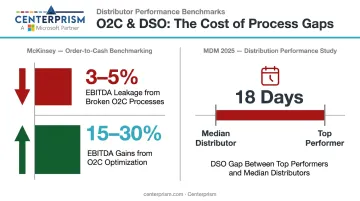
Integrating order management with invoicing and payment collection in one ERP compresses the time between order placement and cash receipt. McKinsey research found that broken order-to-cash processes can create value leakage of 3% to 5% of EBITDA, while O2C optimization can generate 15% to 30% increases in realized EBITDA. For wholesale distributors with large receivable balances, closing that gap is a direct revenue lever.
MDM's 2025 analysis found an 18-day gap between top-performing distributors and median performers on DSO — a difference almost entirely explained by process automation and system integration.
Better Customer Experience and Sales Visibility
Distribution Strategy Group's research found distributor buyers consistently expect their suppliers to provide:
- Real-time order status and shipment tracking
- Live inventory availability before placing orders
- Expected ship dates at the time of purchase
When your ERP delivers that visibility to both customers and sales reps, satisfaction and repeat order rates improve. That visibility extends to internal sales teams as well. When a rep can see that a key account's order frequency has dropped, they can act before losing the business — and that kind of proactive selling runs on real-time data, not a monthly report pulled from a spreadsheet.
Taken together, these three benefits — fewer errors, faster cash collection, and sharper customer visibility — represent the core business case for integrating order management inside your ERP rather than running it as a standalone system.
OMS Built Into ERP vs. Standalone OMS: What Distributors Should Know
A standalone OMS has real merit, but it's largely a retail story. For high-volume retailers managing BOPIS (buy online, pick up in store), dozens of marketplace channels, and multiple 3PL providers, a dedicated OMS can offer deeper fulfillment orchestration than a standard ERP module.
Gartner's 2024 Market Guide for Distributed Order Management identifies standalone DOM vendors across digital commerce, ERP, supply chain execution, and fulfillment orchestration categories — reflecting how broad that market has become for complex retail scenarios.
For industrial distributors, consumer wholesalers, and rental supply companies, the calculus is different. The primary operational need is a unified view of orders, inventory, and financials — not complex retail routing logic across 30 storefronts.
| Scenario | Better Fit |
|---|---|
| Biggest challenges are order accuracy, billing speed, and cash flow | ERP with integrated order management |
| Operating across dozens of marketplaces, storefronts, and 3PLs with complex routing | Standalone OMS worth evaluating |
| Need real-time inventory + AR + sales analytics in one system | ERP with integrated order management |
| Omnichannel retail fulfillment orchestration | Standalone OMS or DOM |
For most distributors, a standalone OMS adds integration overhead and a second vendor relationship without addressing the core problems: cash flow visibility, pricing accuracy, and real-time sales data. An ERP with built-in order management handles all three in a single system.
What to Look for in an ERP with Strong Order Management Capabilities
When evaluating an ERP for distribution order management, focus on these criteria:
- Real-time inventory integration: inventory data must be live at order entry, not batch-refreshed
- Automated invoicing and receivables: invoice generation triggers on shipment confirmation
- Multichannel order capture: the system should handle direct entry, EDI, and online orders in one queue
- Built-in CRM: customer records, pricing agreements, and order history in the same system
- Configurable pricing and discount rules: volume tiers, customer-specific contracts, and promotional pricing
- Sales analytics: margin, trend, and performance data without spreadsheet exports
- Implementation speed: a long deployment timeline delays ROI; same-day operational readiness matters
Centerprism's Full Spectrum ERP is built specifically for distributors and wholesalers on Microsoft Dynamics GP. Its same-day installation is possible because PrismView connects directly to your live database — no separate BI database or ETL configuration required. Core capabilities include:
- Integrated order management and automated receivables
- PrismView analytics for real-time margin and trend visibility
- Advanced sales commissions module with customizable per-salesperson plans
Before committing to any ERP, ask vendors to walk you through the complete order-to-cash workflow end-to-end. Verify the system handles your specific order types — custom-configured products, recurring orders, volume-tiered pricing — before signing.
Frequently Asked Questions
What is ERP in order management?
ERP (Enterprise Resource Planning) connects order management with inventory, finance, and CRM in a single platform. Every order is validated, fulfilled, and invoiced using shared, real-time data — eliminating the silos that isolated tools create.
What are the main types of ERP systems?
The main categories are industry-specific ERP (distribution, manufacturing), cloud-based vs. on-premise deployment, and tier-based platforms (enterprise, mid-market, small business). Distributors and wholesalers typically get the most value from mid-market ERP pre-configured for order-to-cash workflows.
What is the difference between an OMS and an ERP?
A standalone OMS focuses exclusively on the order lifecycle — capture, fulfillment, and tracking. An ERP encompasses order management alongside inventory, finance, HR, and CRM in one platform. An OMS is either a module within the ERP or a separate specialized tool that integrates with it.
What are the key features of order management in an ERP?
The most important features include:
- Automated order entry and validation
- Real-time inventory allocation
- Integrated invoicing and payment collection
- Customer account and pricing management
- Order status tracking with built-in reporting
How does integrated order management in ERP benefit wholesale distributors specifically?
Distributors gain the most from real-time inventory visibility at the point of sale, direct links between orders and accounts receivable, and sales analytics that surface top customers and margins. These connections reduce order errors, speed up cash collection, and give sales teams actionable data to grow revenue.