ERP data integration is the solution to that operational drag. When your ERP connects in real time with your CRM, inventory system, e-commerce platform, and financial tools, data flows automatically across every department — no manual entry required.
This guide covers what ERP data integration is, the three main approaches, key use cases for distributors and wholesalers, the benefits and challenges, and how to choose the right method for your business.
Key Takeaways
- ERP data integration connects your ERP to other business tools so data flows automatically, eliminating silos and manual entry
- The three core approaches (point-to-point, ESB, iPaaS) differ significantly in cost, scalability, and complexity
- Real-time inventory visibility, automated order management, and integrated financials deliver the clearest ROI for distributors
- Data format mismatches, security exposure, and maintenance burden are the top integration challenges a strong platform addresses
- Purpose-built ERP platforms with native integration can eliminate third-party middleware entirely
What Is ERP Data Integration?
ERP data integration is the process of connecting an ERP system to other business applications, databases, and platforms so data flows automatically between them. The result: no manual re-entry, no information delays, no siloed departments operating from different versions of the same data.
Having an ERP vs. Integrating It
An ERP stores data — orders, inventory, financials, customer records. But storing data isn't the same as making it useful across the business. Integration is what moves that data to and from every other tool in your ecosystem: your CRM, warehouse management system, e-commerce platform, and financial software.
Without integration, your ERP becomes a sophisticated database that still requires people to manually move information between systems.
The Single Source of Truth
When ERP data is properly integrated, every department — sales, finance, operations, fulfillment — works from the same real-time information. A sales rep checking a customer's credit status sees the same balance a collections manager sees. An inventory analyst pulling reorder data sees the same stock levels reflected in the e-commerce storefront.
This is the single source of truth in practice — and for distributors and wholesalers managing thousands of SKUs across multiple accounts, it's what keeps pricing, inventory, and customer data consistent at scale.
What Gets Connected in Distribution and Wholesale
In a typical distribution or wholesale environment, ERP data integration connects:
- Customer orders and order history
- Live inventory levels across warehouses
- Pricing rules and customer-specific discounts
- Accounts receivable and outstanding balances
- Supplier records and purchase orders
- Shipping and fulfillment data
- Sales performance by rep, product, and account
Modern vs. Traditional Integration
Older ERP environments relied on batch updates — data exports run overnight or on a schedule. Modern integration supports real-time synchronization, and in distribution and wholesale, inventory can move in minutes. A 2024 survey cited by NetSuite found 68% of respondents identified data silos as their primary concern, up 7% from the prior year — meaning real-time data flow is no longer a differentiator; it's a minimum expectation.
The Three Approaches to ERP Data Integration
Every ERP integration strategy is built on one of three foundational approaches. The right choice depends on your business size, system complexity, and growth trajectory.
Point-to-Point Integration
Point-to-point integration means your IT team builds direct, custom-coded connections between two specific systems — for example, a custom link between your ERP and your CRM.
This approach works for small businesses with only two or three systems to connect. The problem is scale. Each new system added to the mix requires its own custom connection. With five systems, you're managing ten potential connections. With ten systems, the number of connections grows exponentially, and each one needs to be maintained independently.
As IBM notes, point-to-point connections become difficult to configure and maintain as the app network grows — making this approach suitable only for small-scale, static setups where the system count isn't expected to change.
Enterprise Service Bus (ESB)
An ESB takes a centralized approach: a middleware layer sits between all connected systems, acting as a communication hub. Rather than each system talking directly to every other system, they all talk to the bus, which handles data format translation, message routing, and protocol conversion.
ESBs work well for complex, on-premises IT architectures where data formats vary widely across systems. The drawbacks: they require significant technical expertise and, as IBM acknowledges, a centralized ESB component can become a bottleneck that slows innovation.
For businesses shifting to cloud-based or SaaS-heavy environments, the overhead rarely justifies the investment.
Integration Platform as a Service (iPaaS)
iPaaS is the modern, cloud-native approach to ERP integration. These platforms provide prebuilt connectors, drag-and-drop workflow builders, and automated data mapping — connecting systems without heavy custom coding.
The iPaaS market grew 23.4% to $8.5 billion in 2024, according to Gartner, driven by the adoption of no-code/low-code tools and the migration to SaaS environments. For mid-sized distributors and wholesalers, iPaaS delivers faster deployment, lower maintenance overhead, and the flexibility to add new systems without rebuilding existing connections.
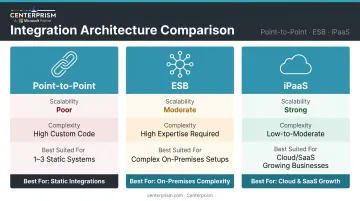
Here's how the three approaches stack up side by side:
Quick Comparison
| Point-to-Point | ESB | iPaaS | |
|---|---|---|---|
| Best Fit | 1-3 systems, static setup | Complex on-premises architectures | Cloud/SaaS environments, growing businesses |
| Scalability | Poor — grows brittle fast | Moderate — centralized but can bottleneck | Strong — built to scale |
| Technical Complexity | High (custom code per connection) | High (requires integration expertise) | Low-to-moderate (prebuilt connectors) |
Key Use Cases for ERP Data Integration
CRM and Sales Management
Integrating an ERP with CRM tools gives sales reps real-time visibility into each customer account: order history, outstanding balances, credit status, and pricing agreements — all without switching between systems.
For distributors managing large account portfolios, this is where integration delivers the fastest sales impact. Aberdeen research found that leading wholesale and distribution businesses were three times more likely to have CRM integrated with ERP compared to average performers — and those same leaders achieved significantly higher on-time delivery rates.
Centerprism's integrated CRM connects directly to the Dynamics GP database, giving sales reps access to customer-based sales views, real-time balance data, and pricing history without leaving the platform.
Inventory and Supply Chain
ERP integration syncs live inventory levels across warehouses, purchase orders, and supplier data in real time. When a sales order is entered, inventory is immediately reserved. When stock drops below a threshold, reorder triggers fire automatically.
Preventing a single large oversell or stockout event often recovers the entire cost of integration. Real-time visibility into:
- Stock levels across all warehouse locations
- Purchase order status and expected arrival dates
- Warehouse movement and allocation activity
eliminates the guesswork behind both problems.

E-Commerce and Order Management
Connecting an ERP to an e-commerce platform ensures product listings always reflect actual inventory, orders flow automatically into fulfillment, and customers receive accurate delivery estimates — without any manual handoff between systems.
Without this integration, a product showing "in stock" online may already be allocated to another order sitting in the ERP. That kind of error damages customer trust quickly.
Finance and Accounts Receivable
ERP integration with financial tools automates invoice generation, payment reconciliation, and collections follow-up. A 2023 NACM/BlackLine report found that 43% of businesses used an ERP with no automation for cash application. Separately, 73% of AR departments did not send automatic collection notices. Both gaps represent manual workloads that integrated AR automation directly eliminates.
Centerprism's Collections Management module handles automated reminders, batch email invoicing, and payment tracking — reducing the time finance staff spend on manual follow-up across large customer portfolios.
Benefits of ERP Data Integration for Distributors and Wholesalers
Real-Time Decision-Making
Integrated ERP data means sales managers and executives can see inventory levels, order trends, profit margins, and customer account status right now — not at end of day, and not after someone builds a spreadsheet report.
For distributors, this directly connects to revenue. Centerprism's own research found that 42% of distributors identified the inability to keep up with growing sales as the top reason for missed revenue opportunities — with the root cause being insufficient real-time visibility.
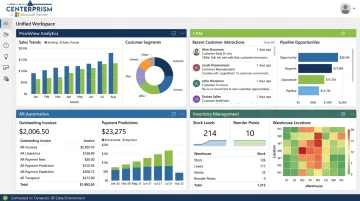
Centerprism's PrismView analytics tool addresses this directly. Built on a live connection to the Dynamics GP database, PrismView surfaces sales trends, best-seller rankings, profit margins, and year-over-year comparisons without requiring a separate database or spreadsheet export. As soon as a transaction is recorded in GP, it's visible in PrismView — no batch refresh cycle, no data lag.
Reduced Manual Work and Fewer Errors
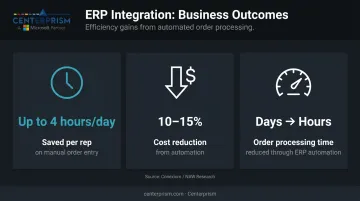
Automating data flow across connected systems — orders, payments, inventory updates — eliminates the manual re-entry that introduces errors and consumes staff time. The same Conexiom report cited earlier found that customer service reps spent up to four hours daily on manual order entry alone — half a workday, per person, every day.
The results of fixing that are measurable. The NAW (National Association of Wholesaler-Distributors) found that organizations integrating automation cut costs by approximately 10-15% and reduced order processing times from days to hours.
Improved Customer Experience
When sales reps and customer service teams have accurate, up-to-date account data — order status, pricing, outstanding balances — customer interactions become faster and more accurate. That means fewer promises made on stale data, and fewer errors that require costly corrections after the fact — which directly affects retention and repeat business.
Scalability Without Rebuilding
ERP data integration allows businesses to add new systems, locations, or product lines without rebuilding existing processes. When data flows automatically to all connected tools, expanding the business means extending an already-working data infrastructure — not starting over.
For Centerprism users, this is built into how the platform is designed. Modules like Sales Commissions, the Product Configurator, and Payables Automation all connect natively to the same underlying GP data environment — no new connectors or middleware required:
- Sales Commissions: Calculates automatically from live GP transaction data
- Product Configurator: Pulls real-time pricing and inventory from the same environment
- Payables Automation: Processes AP against existing GP vendor and account records
Common ERP Data Integration Challenges (and How to Address Them)
Data Format Mismatches
Different systems store data differently — date formats, field names, units of measure, and customer ID structures rarely align out of the box. These mismatches create integration failures if not properly mapped before data transfer begins.
Modern iPaaS platforms and purpose-built ERP extensions with prebuilt connectors handle most mapping automatically. The key is choosing a platform that does this translation natively rather than requiring custom code for each field.
Security and Compliance Risks
Connecting systems that hold sensitive financial, customer, and employee data creates new exposure points. Each integration is a potential entry path if not properly secured.
Look for integration approaches that include:
- Role-based access controls (limiting who can see what data)
- Encryption in transit and at rest
- Audit trails that log data access and transfer events
Ongoing Maintenance When Systems Update
ERP systems update frequently, and those updates can break existing integrations — especially custom-coded point-to-point connections that reference specific field names or data structures.
To reduce that risk, look for platforms that handle these updates automatically:
- Automatic schema detection that adapts when field names or structures change
- Managed update handling that doesn't require manual intervention after every ERP version release
- Purpose-built ERP extensions (which update alongside the core ERP) rather than third-party middleware that falls out of sync
How to Choose the Right ERP Integration Approach
Start by mapping your current systems and data flows. Before selecting an approach, identify which systems need to connect, what data moves between them, and how frequently. For most distributors and wholesalers, real-time sync is essential for inventory and sales data. Batch updates introduce the exact kind of data lag that causes oversells and missed opportunities.
Match the approach to your complexity and growth stage:
- Point-to-point works only for very simple, static setups — two or three systems that are unlikely to change
- ESB may still make sense for large enterprises running complex on-premises ERP environments with heavy customization
- iPaaS is the right default for growing businesses operating in cloud or mixed environments
- Native ERP extensions built directly on your platform eliminate the separate integration layer — and the complexity that comes with it
That last option is where Centerprism fits for distributors and wholesalers already running Microsoft Dynamics GP. The platform connects natively to the GP database — no separate database, no third-party middleware, no extended implementation timeline.
From day one, these modules all share the same live data environment:
- PrismView analytics
- Integrated CRM
- AR automation and collections
- Inventory management
Frequently Asked Questions
What is ERP data integration?
ERP data integration is the process of connecting an ERP system with other business applications and databases to enable automatic, real-time data flow across departments. It eliminates manual data entry and breaks down information silos so every team — sales, finance, operations — works from the same current data.
What is an example of ERP integration?
A wholesaler connecting their ERP to their CRM so sales reps automatically see a customer's order history, outstanding balance, and pricing — without switching systems or waiting for a manual export — is a classic example. The CRM data updates in real time as transactions are recorded in the ERP.
What are the three approaches to ERP integration?
The three approaches are point-to-point integration (direct custom connections), enterprise service bus or ESB (centralized middleware for routing and translation), and iPaaS (cloud-based platforms with prebuilt connectors). For scalable, modern environments, iPaaS is the strongest fit.
What are the main benefits of ERP data integration?
The top benefits include real-time data visibility across departments, fewer manual entry errors, better customer experience from accurate order and account data, and the ability to scale by extending existing data flows rather than rebuilding from scratch.
What are the most common ERP data integration challenges?
Data format mismatches between systems, security exposure from connecting multiple data sources, and the ongoing maintenance burden when ERP systems update are the three most common challenges. All three can be sharply reduced by choosing the right integration platform or a purpose-built ERP with native connectivity.
How long does ERP data integration take to implement?
It depends on the approach: custom point-to-point builds can take months, while iPaaS platforms deploy faster. Purpose-built ERP platforms with native integration, like Centerprism's same-day plug-and-play setup, can be operational within hours for out-of-the-box configurations.