
A manufacturing ERP solves this by uniting every core business process in a single platform with shared data. But the platform is only as strong as its modules. Choosing the wrong combination means paying for functionality you don't need while leaving your actual pain points unaddressed.
This article walks through the 13 essential manufacturing ERP modules, what each one does, and how to evaluate which ones your operation actually requires.
Key Takeaways
- Manufacturing ERP modules split into two groups: production and inventory (MRP, MES, BOM, quality, SCM) and business operations (orders, CRM, procurement, analytics, finance)
- Inventory carrying costs typically run 20–30% of total inventory value — the right modules directly reduce that exposure
- Gartner estimates more than 70% of ERP implementations fail to meet their original goals — module selection and phased adoption matter
- Modules built on a shared native database eliminate data silos — prioritize native integration over bolt-on add-ons when evaluating platforms
What Is Manufacturing ERP and Why Do Modules Matter?
A manufacturing ERP is a unified software platform that integrates procurement, production, inventory, sales, and finance into a single system with a shared database. In practice, that means departments stop working from different data sets — purchasing sees the same numbers as finance, and production updates flow to inventory without anyone manually syncing spreadsheets.
The modular structure is what makes ERP practical to deploy. Rather than a single locked-down application, ERP systems are built from specialized modules that each handle a distinct function while sharing one central database. This means a manufacturer can start with inventory and finance, then layer in production-specific modules as operations mature.
Adoption is accelerating as more manufacturers move off disconnected tools. The ERP software market is valued at $77.1 billion in 2025 and projected to reach $157.1 billion by 2033, driven largely by manufacturers and distributors moving from disconnected tools to integrated platforms.
The module selection decision is where most implementations succeed or fail. Gartner notes that 75% of ERP strategies aren't strongly aligned with overall business strategy — meaning companies often buy features that don't map to their actual operational constraints. The 13 modules below break down exactly what each one does and which operational gap it closes.
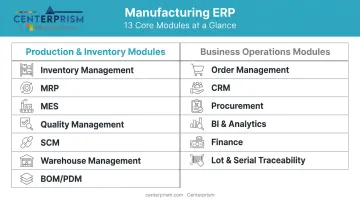
Production and Inventory Modules
These seven modules form the operational backbone of any manufacturing ERP — the layer that keeps the shop floor running, materials flowing, and output quality consistent.
Inventory Management
Inventory modules provide real-time tracking of raw materials, work-in-progress, and finished goods across locations. Core capabilities include reorder points, automated replenishment triggers, and stock visibility by location or category.
Why it matters: inventory carrying costs typically equal 20–30% of total inventory value. Overstocking ties up cash; stockouts stop production. An inventory module addresses both by replacing periodic manual counts with continuous, system-driven visibility.
Materials Requirements Planning (MRP)
MRP is the planning engine that calculates what materials are needed, in what quantities, and by when — based on production schedules and sales forecasts. Instead of reacting to shortages, procurement stays ahead of production demand.
McKinsey estimates that supply chain disruptions lasting a month or more occur every 3.7 years on average, and a 100-day production shock can eliminate 30–50% of one year's EBITDA. MRP won't prevent every disruption, but it dramatically reduces the blast radius.
Manufacturing Execution System (MES)
MES bridges the gap between planned production schedules and what's actually happening on the shop floor. It provides real-time monitoring of:
- Machine status and utilization
- Worker output by shift or station
- Production progress against schedule
- Bottleneck identification and escalation alerts
The value is response time. When a production delay surfaces in an MES, supervisors can act within minutes rather than discovering the problem at the end of a shift — or when a customer calls about a late order.
Quality Management
Quality modules embed inspection checkpoints directly into production workflows rather than treating quality as an end-of-line activity. Key functions include:
- Automated defect flagging at configured checkpoints
- Non-conformance report (NCR) management
- Compliance documentation generation
- Corrective action tracking
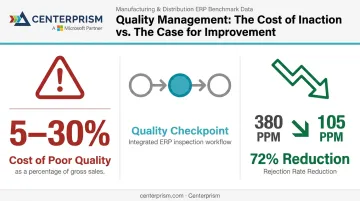
Expert estimates put the cost of poor quality at 5–30% of gross sales for manufacturing companies. A peer-reviewed ERP-Lean case study of an automotive manufacturer reduced rejection rates from 380 PPM to 105 PPM after implementing integrated quality management, a 72% reduction.
Supply Chain Management
SCM modules track material flow from supplier to finished product, monitor supplier performance metrics (lead times, fill rates, on-time delivery), and automate routine transactions like purchase orders.
APQC benchmarks put median perfect order performance at 88% across more than 13,000 companies. SCM modules give manufacturers the supplier visibility needed to close that gap — identifying which vendors are creating risk before a missed delivery becomes a production stoppage.
Warehouse Management
Warehouse management modules optimize storage, picking, and shipping operations through:
- Barcode scanning and directed putaway
- Pick-path optimization
- Real-time order status updates
- Receiving workflow management
For distributors and wholesalers, warehouse efficiency directly affects order cycle time. Centerprism's Full Spectrum ERP includes both a WMS module and a Wireless Warehouse capability — enabling mobile barcode scanning from a smartphone rather than specialized hardware, which keeps implementation costs low and adoption fast.
Bills of Materials (BOM) and Product Data Management
BOM and PDM modules serve as the single source of truth for every product's structure, components, and specifications. Functions include:
- Multi-level assembly management
- Revision history and version control
- Engineering change order (ECO) tracking
APQC reports a median ECO cycle time of 20 days. When BOM data is managed in disconnected spreadsheets or siloed systems, that cycle extends further — and production risks building to an outdated design. A central BOM module eliminates that exposure.
Business Operations Modules
These six modules connect shop floor output to customer commitments, financial performance, and regulatory compliance — turning production data into business intelligence.
Order Management
Order management modules integrate sales, production, and shipping into one continuous workflow. From the moment a quote is accepted to the moment a shipment is confirmed, the system maintains a single view of order status across every function involved.
Key capabilities:
- Automated status updates from quote through delivery
- Alerts for potential fulfillment delays
- On-time delivery KPI tracking
- Integration with inventory and warehouse operations
CRM and Sales Management
CRM modules connect customer history, order data, and service interactions with live production and inventory data , enabling faster response times and accurate delivery commitments.
For distributors and wholesalers, a purpose-built CRM layer goes further. Centerprism's Full Spectrum ERP embeds real-time sales analytics, automated receivables management, and a customizable commission engine directly into the CRM layer. The commission engine supports tiered rates, salesperson splits, paid-invoice triggers, and a sliding depreciation scale that links payouts to invoice aging — keeping sales incentives and collections accountability in sync.
Salesforce's 2026 State of Sales report found that sales professionals spend 60% of their time on non-selling tasks including manual data entry. A CRM integrated with live ERP data replaces that manual work with real-time visibility.
Procurement
Procurement modules centralize vendor management, contract tracking, and purchase order automation — with direct connections to inventory and MRP so buying decisions reflect actual production needs .
APQC benchmarks the median cost to process a purchase order at $55 per transaction. Leading procure-to-pay solutions enable 73% touchless requisition-to-PO automation and 29% lower transaction costs, according to Hackett Group research.
Business Intelligence and Analytics
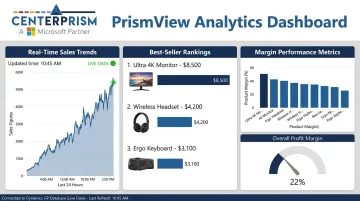
BI modules transform raw ERP data into dashboards that track production performance, sales trends, profit margins, and inventory turns in real time — eliminating the export-to-spreadsheet cycle that makes reporting a lagging indicator.
Centerprism's PrismView analytics tool connects directly to the live Dynamics GP database with no separate BI database required. Users get real-time visibility into sales trends, best sellers, and margin performance without waiting for a report to run or a spreadsheet to be reformatted.
MHI and Deloitte forecast 87% adoption of predictive analytics among supply chain leaders within five years. For most manufacturers and distributors, that makes BI infrastructure a near-term necessity, not a future consideration.
Finance and Accounting
Finance modules serve as the system of record for all financial activity:
- Accounts payable and receivable automation
- Budget management and variance tracking
- Real-time P&L statements
- Audit trail and compliance documentation
APQC reports a median monthly close cycle time of 6 days. Finance modules reduce that cycle by automating reconciliation steps that would otherwise require manual data pulls from disconnected systems. Centerprism's payables automation module includes vendor invoice tracking, payment workflow management, and integrated AR collections with a customer payment portal and credit card processing.
Lot and Serial Traceability
Traceability modules assign unique lot or serial numbers to every raw material, component, and finished product — enabling forward and backward trace through the supply chain for quality investigations, customer complaints, or regulatory audits.
The regulatory stakes are real. Under FDA's FSMA Section 204(d), covered food-supply entities must provide traceability records within 24 hours of an agency request. The average direct cost of a food recall has been estimated at $10 million. When a quality event occurs, traceability determines whether it stays contained or escalates into a full-scale recall.
How to Choose the Right ERP Modules for Your Business
Not every manufacturer needs all 13 modules. The right selection comes from operational reality, not feature checklists.
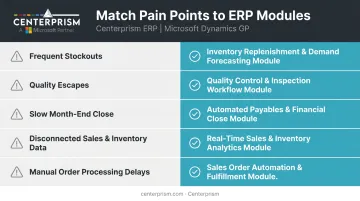
Start with a Pain Point Audit
Map where data gaps, manual handoffs, or recurring errors cost the most time or money — that analysis should drive module prioritization directly:
- Frequent stockouts or overstock situations → Inventory Management and MRP
- Quality escapes reaching customers → Quality Management
- Sales team working from outdated spreadsheets → BI/Analytics and CRM
- Slow month-end close → Finance module with integrated AP/AR
- Compliance exposure in food, pharma, or regulated industries → Lot and Serial Traceability
Evaluate Integration Depth, Not Just Feature Lists
The most important technical question when evaluating vendors isn't "does the module exist?" — it's "do the modules share a native database?" Modules that write to the same data store eliminate re-entry and data lag. Bolt-on integrations recreate the same silos ERP is meant to solve.
Also evaluate:
- Deployment speed and implementation complexity
- Scalability as transaction volume grows
- Quality of implementation support post go-live
Gartner reports that more than 70% of ERP implementations fail to meet their original goals — and the root cause is almost always selection and scoping, not the technology itself. Choosing modules that map to documented business needs, rather than aspirational feature coverage, is where that risk gets controlled.
Plan for Phased Adoption
Start with the modules that establish a data foundation: finance and inventory. Once staff proficiency builds and the core system stabilizes, layer in production-specific and analytics modules.
A phased approach reduces implementation risk and gets your team productive faster. It also reveals which additional modules will actually get used versus which ones look valuable in a sales demo but don't match day-to-day workflows.
Conclusion
The right ERP module combination only delivers real operational gains when selection is guided by actual pain points — not vendor feature checklists. Modules that share native data eliminate the reconciliation bottlenecks that undermine even well-implemented systems.
Start with a clear audit of your highest-cost pain points. Evaluate platforms where modules share native data rather than requiring separate integrations. And favor vendors who offer rapid implementation — long deployment timelines introduce risk and delay ROI.
For distributors and wholesalers with similar integration needs, Centerprism's Full Spectrum ERP offers same-day, plug-and-play deployment with modules that work together out of the box: sales management, inventory, analytics, payables automation, and receivables management, all connected to a single Dynamics GP database. To explore whether it's the right fit for your operation, contact Centerprism at 1-800-814-6631.
Frequently Asked Questions
What are typical ERP modules?
Most ERP platforms include inventory management, finance and accounting, procurement, order management, MRP, and CRM as core modules. Manufacturers typically start with finance and inventory before expanding to production-specific modules like MES, quality management, and traceability.
What are ERP systems in manufacturing?
Manufacturing ERP systems are integrated software platforms that unify production, inventory, procurement, finance, and customer management in a single shared database. They replace disconnected spreadsheets and siloed tools with one system where every function reads from the same data.
What is the difference between MRP and ERP in manufacturing?
MRP (Material Requirements Planning) is a specific module within a broader ERP system. It handles material and production scheduling calculations. ERP covers the full range of business functions — finance, sales, HR, quality, and more — with MRP as one focused component among many.
How do I know which ERP modules my business actually needs?
Start by identifying your biggest operational bottlenecks (inventory accuracy, production scheduling delays, order fulfillment errors) and prioritize modules that directly address those issues. Expand to more specialized functions only after the core system is stable and staff-adopted.
Can manufacturing ERP modules be added over time?
Yes. Most modern ERP platforms are modular by design, so you can implement core modules first and layer in specialized ones as your operation grows. Just make sure the modules share a native database — otherwise, separate integrations recreate the exact silos ERP is meant to solve.