
A Warehouse Management System (WMS) has become the foundational technology that addresses these problems — and the market reflects it. According to MarketsandMarkets, the global WMS market is projected to grow from $4.57 billion in 2025 to $10.04 billion by 2030, a 17.1% annual growth rate driven by exactly these operational pressures.
This guide covers everything you need to know: what a WMS is, how it works, its core features, the four main types, key benefits, and how to choose the right solution for your business.
Key Takeaways
- A WMS manages all daily warehouse operations — receiving, putaway, picking, packing, and shipping — with real-time inventory visibility at its core.
- Four primary WMS types exist: standalone, cloud-based, ERP-integrated, and SCM module — each suited to different operational scales.
- The right WMS cuts manual errors, speeds up fulfillment, and ties inventory data directly to sales and financial decisions.
- Distributors and wholesalers outgrowing spreadsheets need a WMS before rising order volume turns small process gaps into costly fulfillment failures.
What Is a Warehouse Management System?
Gartner defines a WMS as "a software application that helps manage and intelligently execute the operations of a warehouse." ASCM expands that to include optimization of workflows and storage of goods across the entire facility.
In practice, a WMS serves as the central hub for everything that happens between a truck pulling into your receiving dock and a shipment leaving your shipping dock — inventory control, labor tasks, order fulfillment, and the data that connects them all.
How WMS Evolved Beyond Spreadsheets
Early warehouse management meant paper receiving logs, clipboards, and Excel files updated at the end of each shift. The problem: data was always stale, errors compounded quietly, and nobody knew exactly where anything was without physically walking the floor.
Modern WMS platforms replaced that with real-time, scan-verified workflows that integrate with ERPs, transportation management systems, and automation equipment. Operations that once managed with spreadsheets now find that real-time workflow control is a basic requirement once order volumes pass a certain threshold — not a premium feature.
WMS vs. Inventory Management System vs. OMS
These three systems are frequently confused. Here's the practical distinction:
| System | What It Does |
|---|---|
| Inventory Management System (IMS) | Tracks stock quantities across locations |
| Warehouse Management System (WMS) | Manages physical warehouse workflows: receiving, putaway, pick paths, labor tasks, shipping |
| Order Management System (OMS) | Manages the full order lifecycle across all sales channels |
A WMS and OMS are complementary. The OMS captures and routes orders; the WMS executes them physically. In integrated environments, the two systems pass data back and forth in real time — order status, inventory availability, shipment confirmations.
Who Relies on WMS Most
- Industrial distributors managing high-SKU, multi-location inventories
- Consumer wholesalers fulfilling large B2B orders with tight delivery windows
- 3PL providers running operations on behalf of multiple clients
- E-commerce fulfillment centers processing high daily order volumes
- Companies operating across omnichannel sales environments
Core Features of a WMS
Receiving and Putaway
When goods arrive, a WMS uses barcode or RFID scanning to automatically validate inbound shipments against purchase orders. Any discrepancies (wrong quantities, wrong items) surface immediately rather than weeks later during a count. The system then assigns optimal storage locations based on rules like item velocity, size, or zone, and updates inventory records in real time. That eliminates after-the-fact reconciliation entirely.
Inventory Tracking and Cycle Counting
A WMS provides location-level visibility into every SKU across all warehouse zones — not just "we have 400 units of Item X," but "200 are in Zone A, Row 3, Bin 7, and 200 are in Zone C staging." That granularity matters when a picker needs an item fast or a manager needs to reconcile a discrepancy.
Continuous cycle counting replaces the disruptive annual physical inventory count. Instead of shutting down operations once a year to count everything, a WMS rotates counts through the warehouse continuously — keeping accuracy high without the operational disruption.
Order Picking, Packing, and Shipping
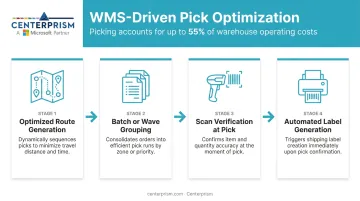
Order picking accounts for up to 55% of total warehouse operating costs, according to a peer-reviewed systematic review in the International Journal of Production Economics. That makes pick optimization one of the highest-ROI applications of a WMS.
A WMS optimizes picking through:
- Routes pickers along the most efficient path through the warehouse
- Groups orders using batch, zone, or wave picking to cut travel time
- Confirms the right item at the point of pick with scan verification
- Generates shipping labels automatically, removing manual entry and carrier errors
Labor Management
A WMS turns labor from an unpredictable cost into a measurable, manageable asset. Key capabilities include:
- Tracks individual worker productivity by task type
- Assigns tasks based on proximity and skill level
- Surfaces real-time bottleneck visibility for floor managers
- Feeds shift scheduling and performance reporting with live data
Analytics and Reporting
WMS platforms capture operational data automatically and surface it in dashboards and reports. Key metrics typically include:
- Order accuracy rates
- On-time shipment percentages
- Inventory turns
- Fill rates
- Cost per order
For distributors running Microsoft Dynamics GP, ERP-integrated WMS analytics can surface these metrics without a separate BI database. Centerprism's PrismView, for example, connects directly to your operational data and delivers real-time dashboards on the same day it's installed.
Types of Warehouse Management Systems
Standalone WMS
A standalone WMS focuses purely on warehouse operations — receiving, putaway, picking, packing, shipping — without handling broader business functions like accounting, purchasing, or CRM. It's typically the most affordable entry point and works well for small-to-midsize warehouses that need deep warehouse control without replacing their existing back-office systems.
The tradeoff: data doesn't flow automatically between your WMS and your financial or sales systems. Bridging that gap requires either manual effort or a custom integration build.
Key limitations to weigh:
- No automatic sync with accounting or sales data
- Custom integrations add cost and maintenance overhead
- Works best when back-office systems are already stable
Cloud-Based WMS
Cloud-based WMS platforms are hosted on remote servers and accessed via a browser — no on-premise servers required. According to Mordor Intelligence, cloud-based WMS accounted for 55.21% of revenue share in 2025 and is the fastest-growing deployment type at 16.92% CAGR through 2031.
Key advantages:
- Lower upfront capital costs (subscription vs. license)
- Automatic software updates
- Remote access across multiple locations
- Easier integration with e-commerce platforms and shipping carriers
- Built-in scalability as order volume grows
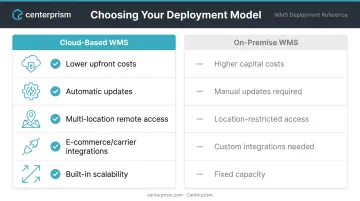
For growing businesses or those with multiple warehouse locations, cloud-based WMS removes much of the IT infrastructure burden.
ERP-Integrated WMS
An ERP-integrated WMS is a warehouse management module built directly into an Enterprise Resource Planning (ERP) platform. The result is end-to-end data flow across purchasing, inventory, sales, finance, and fulfillment — all from a single system.
This matters most for distributors and wholesalers. When a shipment is received, it should immediately update inventory levels, trigger replenishment if needed, and be visible to the sales team quoting lead times. When an order ships, it should update receivables automatically.
That real-time connection between warehouse activity and financial data is only seamless when both live in the same platform.
Centerprism's Full Spectrum ERP takes this approach — connecting inventory movements directly to sales, pricing, and receivables workflows inside Microsoft Dynamics GP for industrial distributors and wholesalers.
SCM Module WMS
Supply Chain Management (SCM) module WMS connects warehouse operations to broader supply chain planning tools — transportation management, demand forecasting, and supplier coordination. This level of complexity is best suited for large enterprises managing multi-node, global supply chains where the warehouse is one node among many that must be orchestrated.
Key Benefits of Implementing a WMS
Improved Inventory Accuracy
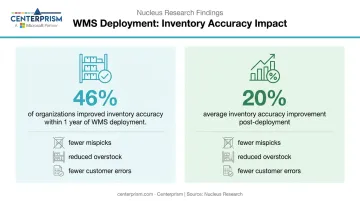
Nucleus Research found in 2023 that 46% of organizations increased inventory accuracy within one year of WMS deployment, with an average improvement of 20%. That accuracy gain has downstream effects: fewer mispicks, less overstock tying up working capital, and fewer customer-facing errors that require costly correction.
Faster Fulfillment and Higher Customer Retention
McKinsey data shows average US e-commerce delivery speed improved roughly 40% between 2020 and 2024 — and B2B buyers are now applying that same standard to their distribution partners. A WMS directly supports the speed and accuracy those buyers expect through:
- Optimized pick paths that cut travel time per order
- Automated task assignment based on zone, priority, or worker availability
- Scan verification at pack stations to catch errors before shipment
For distributors, faster and more accurate fulfillment translates directly to customer retention.
Scalability Without Proportional Headcount Growth
A well-implemented WMS allows businesses to absorb volume spikes, add product lines, and expand to new locations without hiring proportionally to keep up. The infrastructure scales with the business rather than constraining it — making a WMS a genuine growth enabler, not an operational overhead.
Signs Your Business Needs a WMS
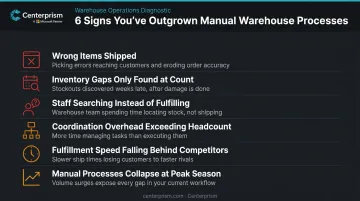
Not every warehouse needs enterprise-grade WMS complexity. But there are clear signals that your current approach is costing you:
- Customers receive wrong items or quantities with increasing frequency
- Inventory discrepancies surface only during physical counts, with no visibility between them
- Staff spend time searching for orders rather than fulfilling them
- Coordination overhead grows faster than headcount can absorb as SKU count rises
- Fulfillment speed falls behind competitors, costing you repeat business
- Manual processes hold up at average volume but collapse under peak-season pressure
The tipping point for most distributors and wholesalers is when adding SKUs, sales channels, or warehouse locations multiplies the coordination problem exponentially. At that point, manual systems become a ceiling, not just a constraint.
How to Choose the Right WMS
Assess Scale, Complexity, and Integration Needs
Before evaluating any WMS, document your operation honestly:
- Current daily order volume and peak-season peaks
- Number of active SKUs and how frequently that changes
- Number of warehouse locations
- Existing software stack (ERP, accounting, CRM, e-commerce)
- Whether you need standalone warehouse depth or full ERP integration
Matching system complexity to operational reality matters. A system built for a 10-warehouse enterprise will overwhelm a single-site distributor — and a lightweight tool will buckle under the volume of a complex operation within months of deployment.
Prioritize Real-Time Visibility and Fast Implementation
The best WMS deployments deliver value quickly. Traditional on-premise implementations often require weeks of database configuration, data migration, and system integration before the warehouse sees any benefit.
For distributors and wholesalers, key implementation questions include:
- How long before the system is live and usable on the warehouse floor?
- Does the analytics layer require a separate database setup?
- Can the vendor demonstrate a working system, not just a demo environment?
Centerprism's approach — same-day implementation with real-time analytics through PrismView, requiring no separate database — directly addresses the gap most distributors encounter between purchase and productive use.
Plan for Change Management
Technical capability alone doesn't determine WMS success — user adoption does. A system that warehouse staff distrust or avoid defeats its own purpose.
Practical considerations:
- Evaluate UI intuitiveness for warehouse floor staff (not just managers)
- Confirm vendor training resources are adequate for your team size
- Involve warehouse supervisors in the selection process
- Plan for a transition period where both old and new processes run in parallel
Resistance to new systems is predictable. Addressing it during vendor selection — rather than scrambling after go-live — means the system starts earning its keep sooner.
Frequently Asked Questions
What are the four types of warehouse management systems?
The four main types are standalone WMS, cloud-based WMS, ERP-integrated WMS, and SCM module WMS. Standalone systems focus purely on warehouse operations; cloud-based systems add scalability and lower upfront costs; ERP-integrated systems connect warehouse data to financials and sales; SCM modules extend to broader supply chain planning.
Is a warehouse management system difficult to learn?
Modern WMS platforms — particularly cloud-based and ERP-integrated options — are designed for warehouse staff with guided workflows, barcode scanning, and intuitive interfaces. Complexity varies by system, but vendor training and onboarding support are the primary factors that determine how quickly teams reach full productivity.
What is the difference between a WMS and an inventory management system?
An IMS tracks stock quantities. A WMS manages the full physical workflow inside a warehouse — receiving, putaway, pick paths, labor tasks, and shipping. WMS is the more comprehensive operational tool; IMS is typically a component within it or a simpler predecessor.
What are the core features of a warehouse management system?
Core features include receiving and putaway automation, real-time location-level inventory tracking, pick-path optimization and order picking, labor management and task assignment, and operational analytics and reporting.
How long does it take to implement a warehouse management system?
Implementation timelines vary by system type and complexity. On-premise standalone systems can take months. Modern cloud-based and ERP-integrated solutions deploy significantly faster — in some cases the same day, as with platforms like Centerprism that require no separate database configuration.
What is the difference between a WMS and an ERP?
An ERP manages company-wide business processes — financials, sales, purchasing, HR. A WMS focuses specifically on warehouse operations. ERP systems with built-in WMS modules connect inventory movements directly to financial and sales data, with no manual bridging required.