The true cost goes well beyond the monthly fee. Implementation, data migration, training, and middleware all add up before a single order ships. This guide breaks down every major pricing model, what drives costs up or down, and how to calculate what you'll actually spend in year one.
Key Takeaways
- Lightweight inventory tools can start below $150/month, but Capterra's 2026 pricing research puts the current market average closer to $260/month at entry level
- Per-user pricing catches growing distribution teams off guard; flat-rate models are far more predictable for seasonal or cross-trained staff
- Hidden costs like implementation, data migration, and integration middleware can easily double or triple first-year spend
- For distributors juggling multiple subscriptions, an integrated ERP typically delivers lower total cost of ownership within 2–3 years
- Always calculate a 12-month TCO before comparing options — monthly sticker price alone is unreliable
How Much Does Inventory Management Software Cost?
Inventory management software doesn't have a fixed price. Costs vary based on deployment type, number of users, feature depth, order volume limits, and whether the system is standalone or part of a larger platform. Most buyers underbudget because they compare monthly fees without accounting for what those fees actually include — or exclude.
Capterra's 2026 inventory pricing research puts current market averages at roughly $260/month for entry-level flat-rate plans, $520/month for mid-tier, and $746/month for high-end platforms. The $50–$150 range exists, but it covers lightweight tools with tight order caps and limited users — not what most distributors are buying.
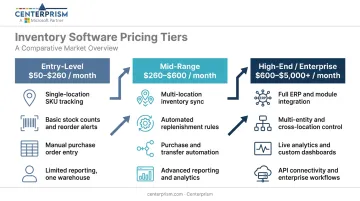
Entry-Level / Basic Setup ($50–$260/month)
Typical inclusions:
- Basic SKU and stock tracking
- Reorder alerts
- Single-location support
- Limited users (often 1–2)
- Simple reporting, minimal integrations
What's usually missing: Multi-warehouse support, advanced automation, ERP connectivity, higher order volumes.
Best for: Solo operators, early-stage businesses, or companies with a small and stable SKU count that don't yet need cross-system data flow.
Mid-Range / Standard Setup ($260–$600/month)
Typical inclusions:
- Multi-location tracking
- Vendor management and purchase orders
- Real-time stock updates
- Integrations with accounting or sales platforms
- Higher user and order limits
What's usually missing: Advanced forecasting, product configurators, commission management, deep analytics.
Best for: Growing distributors managing multiple warehouses or sales channels who need reliable automation without full ERP complexity.
High-End / Enterprise Setup ($600–$5,000+/month)
Typical inclusions:
- Advanced forecasting and warehouse management
- Full ERP capabilities — CRM, financials, analytics
- Dedicated support and custom integrations
- Enterprise user and location capacity
Enterprise platforms are functionally comprehensive, but implementation and customization costs are often substantial and billed separately from the subscription fee.
This tier suits large distributors, multi-entity wholesalers, and businesses that require deep customization and enterprise-wide real-time visibility.
Pricing Models Explained: SaaS, Per-User, Flat-Rate, and One-Time Licensing
Two systems at the same sticker price can produce very different 12-month totals depending on how the pricing model scales. GetApp's 2026 inventory category lists 510 subscription-based inventory products versus just 36 one-time license options — so SaaS is the default assumption, but how that subscription is structured matters enormously.
Per-User (Seat-Based) Pricing
A base fee plus a monthly charge per active user. It looks manageable at two users, then grows expensive fast as warehouse staff, purchasing managers, and sales reps are added.
Example: At $50/user/month with a $100 base fee, a 10-person distribution team pays $600/month — before any add-ons. Software Advice's 2024 buyer study reports an average inventory software budget of $142/user/month, meaning that same 10-person team could easily be looking at $1,420/month before implementation or integrations.
Per-user pricing consistently surprises growing distribution teams, particularly when seasonal staff or cross-trained employees need temporary access.
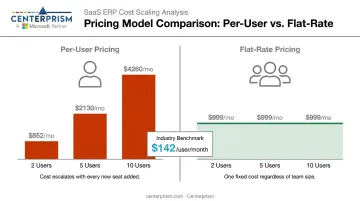
Flat-Rate (Volume or Tier-Based) Pricing
A fixed monthly fee for a defined feature set or order volume, regardless of user count. Fishbowl's tiered structure illustrates how this works in practice: $229/month for 2 users, $429/month for 5 users, $729/month for 10 users — the price jumps are tied to included users and features, not purely per-seat math.
For distributors with seasonal staff fluctuations or multiple roles needing occasional access, flat-rate models offer more predictable annual spend.
SaaS Subscription vs. One-Time License
Beyond pricing structure, the deployment model shapes your total cost. The table below shows how SaaS and one-time licenses compare across the factors that matter most to distribution buyers.
| Factor | SaaS Subscription | One-Time License |
|---|---|---|
| Upfront cost | Low | High |
| Updates included | Yes | Usually extra |
| Support included | Typically yes | Often separate fee |
| Hosting | Vendor-managed | Your servers |
| Market availability | 510+ products | 36 products |
SaaS dominates the market, but one-time licenses still appear in legacy ERP evaluations. Annual billing typically saves 15–20% over month-to-month (inFlow explicitly advertises 20% annual savings). That said, annual commitments make sense only when you're confident about feature fit. Month-to-month flexibility is worth the premium during evaluation periods.
Modular / Add-On Pricing
A base platform with optional paid modules layered on top. The entry price looks low, but once you enable the features a distribution operation actually needs, the total often rivals mid-tier all-in-one platforms. Common add-ons include:
- Advanced reporting and analytics
- CRM and customer management
- Sales commission tracking
- E-commerce or EDI integration
This pattern shows up frequently in distribution software evaluations. Always ask what's included versus what's an add-on before comparing quotes.
Key Factors That Affect the Cost of Inventory Software
Two distributors in the same industry can land at very different price points based on how they configure and use the system. Here's what actually drives the number.
Number of Users and Locations
Under per-seat models, adding warehouse staff, purchasing managers, and sales reps compounds costs quickly. Multi-location operations — separate warehouses, branches, sales territories — add further layers.
For distributors running three or more locations with double-digit staff counts, per-user pricing often exceeds flat-rate alternatives by a significant margin. Run the math side-by-side before committing — per-user pricing can easily outpace flat-rate alternatives at scale.
Feature Depth and Specialization
The specific capabilities required determine which tier is unavoidable:
- Lot tracking and serialized inventory — often mid-tier or higher
- Product configurators — specialized, not widely included in base plans
- **Automated receivables and commission management** — typically add-ons or enterprise features
- Multi-warehouse management — mid-range minimum
Industry-specific tools built for distribution may cost more upfront but eliminate the need for workarounds that accumulate costs over time.
Integration Requirements
Connecting inventory software to accounting platforms, CRMs, e-commerce channels, or shipping carriers adds cost through:
- Native integration fees — charged per connected platform on some systems
- Third-party middleware (Zapier, Make) — starts free at low volumes but scales with usage; Zapier's free plan covers only 100 tasks/month
- Custom API development — a project cost that can reach five figures for complex integrations
Middleware cost is recurring, not one-time. Budget for it annually.
Implementation and Onboarding Complexity
Self-service setup for lightweight SaaS can cost very little. As scope expands — data migration, process redesign, multi-system integrations — implementation becomes the primary first-year cost. Clutch-listed ERP consultants show minimum project sizes ranging from $5,000 to $25,000+. Panorama's 2024 ERP Report puts the median full ERP project cost at $450,000, with 46% of projects exceeding budget.
Always confirm upfront whether onboarding is included in the subscription or billed separately.
What's Included vs. Hidden: The True Cost of Ownership
The monthly subscription is rarely the full story. Vendors structure pricing to look lean upfront — implementation fees, migration work, and integration costs often surface only after the sales call. These are the categories that routinely catch buyers off guard:
| Cost Category | Type | Notes |
|---|---|---|
| Software subscription | Recurring | Annual billing saves 15–20% vs. monthly |
| Implementation and setup | One-time | Ranges from self-service to $25,000+ for complex projects |
| Data migration | One-time | Varies by SKU count, history volume, and data cleanliness; request a vendor quote |
| Team training | One-time (sometimes recurring) | Include temporary productivity loss in your estimate |
| Hardware (scanners, tablets) | One-time | Get current SKU quotes; prices vary widely by device type |
| Ongoing support | Recurring | Some vendors include it; others charge for priority access |
| Integration middleware | Recurring | Starts low but scales with automation volume |
First-Year TCO = (Monthly Subscription × 12) + Implementation + Migration + Training + Hardware + Middleware (annual)
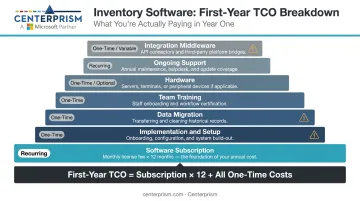
Using Capterra's average tier benchmarks, software alone runs $3,120–$8,952/year before any services or hardware. Add a modest implementation project and that figure climbs substantially. Panorama's consulting research puts 46% of ERP projects over budget, which makes a contingency line item non-negotiable for any project involving migrations or integrations.
Standalone Software vs. Integrated ERP: Which Costs Less Long-Term?
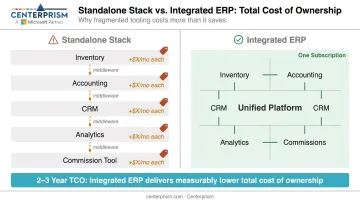
The core trade-off: standalone inventory software costs less upfront but typically requires separate subscriptions for accounting, CRM, analytics, and receivables. Each tool brings its own licensing, training curve, and integration overhead. BetterCloud reports the average company runs 106 SaaS apps, and each new connection between systems is a potential point of failure — and cost.
An integrated ERP platform changes the math. A single system covering inventory, sales management, CRM, receivables, analytics, and commission tracking eliminates redundant licenses, reduces middleware complexity, and simplifies staff training. For distributors managing complex sales workflows, consolidation often produces a lower total cost of ownership over a 2–3 year period.
Side-by-side for a mid-sized distributor:
| Approach | What You're Paying For | Hidden Cost Risk |
|---|---|---|
| Standalone stack | Inventory + accounting + CRM + analytics + commission tool, each billed separately | Middleware subscriptions, integration maintenance, duplicate data entry, fragmented reporting |
| Integrated ERP | Single platform, one subscription, one support relationship | Higher implementation cost upfront; implementation scope must be right-sized |
Centerprism's ERP, built on Microsoft Dynamics GP for distributors and wholesalers, addresses this directly. PrismView connects to the GP database in real time — no separate BI database required — which eliminates one of the most common hidden cost additions: bolting on a standalone analytics tool after the fact. The same-day plug-and-play implementation also removes the onboarding overhead typical of traditional ERP rollouts.
That said, ERP consolidation makes sense when process complexity justifies it — not before. A two-person operation running Zoho Inventory at $29/month doesn't need a full ERP. A distributor managing three warehouses, a commission-based sales team, and five separate tool subscriptions probably does.
How to Budget Smartly — and Mistakes to Avoid
Getting your budget right means looking beyond the monthly subscription line. Before you set a number, evaluate these factors:
What to Evaluate Before Setting a Budget
- Transaction volume and order frequency — directly affect which tier you need
- User count and locations — determines whether per-user or flat-rate is more economical
- Required integrations — native vs. middleware, and recurring cost of each
- Industry-specific features — product configurators, tiered pricing, receivables automation
- Expected growth over 12–24 months — price what you'll need, not just what you have today
Most Costly Budgeting Mistakes
- Comparing monthly fees without calculating 12-month TCO
- Choosing the cheapest option without evaluating support quality or scalability
- Over-specifying features that won't be used in year one
- Underestimating the cost of switching platforms once you've outgrown them
Questions to Ask Every Vendor Before Committing
- Is onboarding included in the subscription, or billed separately?
- What does pricing look like at 2× our current team size?
- Are integrations native or middleware-dependent?
- What is included in the support tier — and what triggers an upgrade?
- Are software updates included in the subscription?
Frequently Asked Questions
What is the most common pricing model for inventory management software?
SaaS subscription pricing — either per-user or flat-rate — is the dominant model. GetApp lists 510 subscription-based products versus just 36 one-time license options in 2026. Most vendors offer both monthly and annual billing, with annual commitments typically saving 15–20%.
Is per-user or flat-rate pricing better for distributors and wholesalers?
Flat-rate pricing generally offers better value for distribution teams. Staff counts fluctuate seasonally, multiple roles need occasional access, and per-user costs compound quickly as teams grow. Flat-rate annual pricing keeps spend predictable across warehouse, sales, and purchasing functions regardless of headcount shifts.
What does inventory management software typically cost for a small distributor?
Software subscriptions alone run roughly $3,000–$9,000/year based on Capterra's current tier averages. Add implementation help ($5,000–$25,000+ based on Clutch project minimums), migration, training, and any hardware, and first-year TCO often runs two to three times the subscription cost alone.
What hidden costs should I watch for when budgeting for inventory software?
The biggest surprises: implementation and setup fees, data migration charges (always get a written quote since scope varies widely), middleware subscriptions for integrations, hardware (barcode scanners, tablets), and premium support tiers. These routinely double or triple the first-year total beyond the subscription.
When does it make more sense to invest in an integrated ERP instead of standalone inventory software?
Once a distributor is managing multiple tool subscriptions for inventory, CRM, receivables, and analytics separately, the combined subscription cost, integration complexity, and reporting gaps often exceed what a purpose-built integrated ERP would cost. At that point, consolidating into a single platform typically reduces both annual spend and the overhead of maintaining separate integrations.