Introduction
Picture this: a sales rep from a wholesale distributor drives two hours to meet with a key buyer. The buyer is ready to place a large order — but wants to confirm product availability and check whether their account is current on credit. The rep can't verify either from their phone. They promise to follow up. By the time they're back at the office and logged into the desktop ERP, the buyer has moved on.
That lost deal isn't a people problem. It's a systems problem.
Mobile ERP solves it by extending your full ERP system — inventory, orders, customer accounts, approvals, analytics — to smartphones and tablets. Field teams get the data they need, when and where they need it.
This guide covers:
- What mobile ERP is and how it works
- The features that matter most for distributors and wholesalers
- Key benefits for field and operations teams
- Common implementation pitfalls to avoid
- How to choose the right solution
Key Takeaways
- Mobile ERP extends your core ERP system to mobile devices, not a standalone replacement
- Real-time sync, role-based access, and offline capability are non-negotiable features
- Over 99.9% of compromised accounts lack MFA — make it mandatory for every mobile ERP user
- Implementation fails most often due to poor adoption, not poor technology
- A purpose-built mobile UX drives adoption far more than a long feature list
What Is Mobile ERP and How Does It Work?
Mobile ERP is an extension of a traditional ERP system that surfaces core business functions — inventory, sales, CRM, approvals, reporting — through smartphones and tablets. Employees don't need to be at a desktop to check a customer's credit status, confirm stock levels, or approve a purchase order.
The Technical Foundation
Mobile ERP requires a cloud-based ERP backend. The mobile app connects via secure internet access or APIs, syncing data in real time so any update made in the field is immediately reflected in the central system. According to Microsoft, cloud ERP is specifically designed to enable access to data and tools from anywhere — which is why cloud infrastructure is the prerequisite for any meaningful mobile ERP experience.
Panorama Consulting's 2024 ERP Report found that 96.5% of surveyed organizations selected cloud software — up from 52% in the prior report — reflecting how thoroughly cloud ERP has become the standard deployment model.
The "Less Is More" Design Principle
A well-designed mobile ERP is a purpose-built extension of the desktop system — not a compressed replica of it. It surfaces only the functions most critical to each user's role, presented in a streamlined, touch-friendly interface.
In practice, that means different employees see entirely different tools:
- Warehouse associates get inventory counts, receiving queues, and bin location lookups
- Sales managers get customer accounts, pricing tiers, and performance dashboards
- AP staff get pending approvals and invoice queues
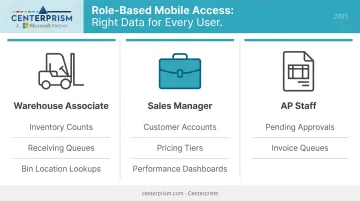
The goal is usability in the field, not feature parity with the desktop.
Must-Have Features of Mobile ERP Apps
For distributors and wholesalers, these five capabilities determine whether a mobile ERP app actually changes how the business operates — or just adds another screen to ignore.
Real-Time Data Sync
Any entry made on the mobile app — an order placed, a payment received, inventory adjusted — must instantly update the central ERP database. Without this, field teams and back-office staff work from different versions of reality, which creates errors and delays. Real-time sync is the feature that makes mobile ERP more than a fancy notepad.
Role-Based Access Controls
Not every user should see everything. A warehouse associate needs inventory and receiving functions. A sales manager needs customer accounts, pricing history, and performance dashboards. Role-based permissions protect sensitive data, reduce the chance of costly input errors, and keep the mobile interface uncluttered for each user type.
Sales and CRM Tools
For field sales reps at wholesale and distribution companies, this is the most critical feature category. Strong mobile CRM tools let reps:
- View full customer account history and open orders
- Check credit limits and account status in real time
- Confirm live product availability by location
- Create or modify orders on-site
That means closing deals during the customer visit, not the next morning. Centerprism's PrismView analytics tool extends this further, giving sales reps instant visibility into trends, best sellers, and profit margins without downloading spreadsheets or waiting for a report to run.
Offline Functionality
Warehouses have dead zones. Delivery routes pass through areas with no signal. A mobile ERP app that requires a strong connection fails in exactly the places field teams rely on it most. Look for apps that allow users to record transactions and view cached data offline, then sync automatically when connectivity is restored.
Alerts, Notifications, and Mobile Dashboards
Push notifications for time-sensitive events — low stock, pending approvals, overdue payments — keep the right people informed without requiring them to run reports. Customizable dashboards that surface role-specific KPIs (not a wall of every metric in the system) enable faster decisions in the field.
Key Benefits of Mobile ERP for Distributors and Wholesalers
Faster Sales Cycles
Field sales reps who can check live inventory, confirm pricing, and submit orders from a customer's location don't need to follow up from the office. Real-time data makes on-site closing possible — and significantly more likely.
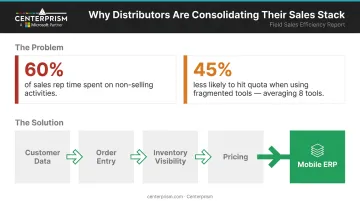
The productivity case is clear: Salesforce research shows sales reps already spend 60% of their time on non-selling activities and use an average of 8 tools to manage their work. Reps overwhelmed by fragmented systems are 45% less likely to hit quota.
Mobile ERP consolidates customer data, order entry, inventory visibility, and pricing into one tool — which directly addresses that overload.
Real-Time Operational Visibility
Managers gain insight into what's happening across warehouses, delivery routes, and customer accounts without waiting for end-of-day reports. That visibility drives better purchasing decisions, faster responses to supply problems, and fewer stockouts. Centerprism's Sales Activity Dashboard and PrismView provide this visibility live — connected directly to the GP database with no export required.
Improved Customer Service
When sales and support teams can pull up a customer's full account history, open invoices, and credit status during any interaction — not just when they're at their desk — they resolve issues faster. Forrester research links customer-obsessed companies to 28% faster revenue growth, 33% higher profitability growth, and 43% better retention rates. Access to complete customer data at the moment of interaction is a direct input to that outcome.
Reduced Manual Data Entry and Errors
The typical field workflow without mobile ERP: rep writes notes during a customer visit, returns to the office, re-enters the data into the system. Every re-entry step is a chance for errors. APQC identifies manual data entry as a persistent source of errors and unnecessary expense, and maintains specific benchmark measures for manual sales order interventions caused by incorrect data.
Mobile ERP eliminates the re-entry step. Data entered in the field flows directly into the ERP — one entry, one source of truth.
Business Continuity for Distributed Teams
Distribution businesses rarely operate from a single location. Warehouse staff, delivery drivers, field sales reps, and office teams all need to work from the same data. Centerprism addresses this across two integrated tools:
- Wireless Warehouse connects directly to the central database, so every warehouse location works from identical live inventory data
- Mobility module extends that same real-time access to field and remote teams, so no employee is working from yesterday's numbers
Common Challenges and How to Address Them
Security Risks on Mobile and BYOD Devices
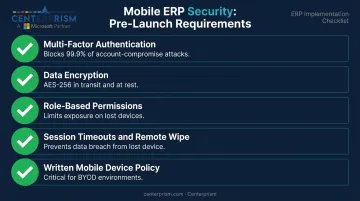
Accessing ERP data on a personal phone introduces vulnerabilities that a desktop environment typically doesn't face. The fix isn't complicated, but it must be configured before launch:
- Multi-factor authentication (MFA) — Microsoft's data shows MFA blocks over 99.9% of account-compromise attacks; configure it before go-live, not after
- Data encryption — enforce it both in transit and at rest; most enterprise ERP vendors support AES-256 by default
- Role-based permissions — limits exposure if a device is lost or stolen
- Session timeouts and remote wipe capability — ensure a lost device doesn't become a data breach
- A written mobile device policy is especially critical in BYOD environments, where the line between personal and company data blurs
Connectivity Limitations
Warehouses often have WiFi dead zones. Rural delivery stops may have no signal at all. Evaluate offline functionality as a hard requirement, not a nice-to-have. Before selecting a vendor, ask:
- How does the app behave with no connectivity — read-only, or fully functional?
- How long is data cached locally on the device?
- How are sync conflicts resolved when the connection returns?
User Adoption Friction
Even when connectivity is solid, the human side of rollout can derail a mobile ERP deployment. Gartner reports that by 2027, more than 70% of recently implemented ERP initiatives will fail to fully meet their original business-case goals — and up to 25% will fail outright. Low end-user adoption is a primary driver. Employees accustomed to desktop workflows don't automatically embrace mobile tools.
Three things reduce this friction:
- Choose an app with a mobile-first UI — not a desktop screen made smaller
- Start with a focused pilot group in one workflow before company-wide rollout
- Provide hands-on training tied to specific job tasks, not generic feature walkthroughs
Best Practices for Mobile ERP Implementation
Start Narrow and Expand
Don't attempt to deploy every ERP function on mobile on day one. Start with one or two high-impact workflows — mobile order entry for field sales, or inventory scanning in the warehouse — and demonstrate measurable ROI before expanding. A focused pilot gives you real feedback, surfaces integration issues early, and builds internal support for expanding the rollout.
Design for the User's Context
The mobile interface should surface only what a user needs in the field at that moment. A sales rep checking in with a buyer doesn't need access to AP aging or HR data. A warehouse associate scanning stock doesn't need commission dashboards.
Attempting to replicate the full desktop ERP on mobile creates a bloated, confusing experience that employees avoid. The mobile app should complement the main system, not mirror it.
Treat Security as a Foundation
Security configuration belongs at the start of implementation — not after something goes wrong. Before go-live, confirm:
- Encrypted data transmission
- MFA enforced for all mobile users
- Session timeouts active
- Remote device wipe available
- Access audit schedule established
This baseline applies whether employees use company devices or personal phones.
Measure Adoption and Iterate
Set specific success metrics before launch and track them against actual results. Useful starting points include:
- Orders placed via mobile per week
- Reduction in order entry errors
- Approval turnaround time
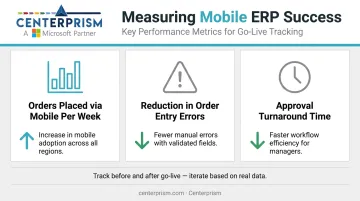
Use that data to identify which workflows need refinement and which users need additional training. Mobile ERP improves through iteration, not a single deployment.
How to Choose the Right Mobile ERP Solution
Key Evaluation Criteria for Distributors and Wholesalers
Industry Fit and Integration Depth
A generic mobile ERP often lacks features specific to distribution: multi-location inventory visibility, customer-specific pricing, and credit management. Beyond feature coverage, verify the mobile app is tightly integrated with the core ERP — not a bolt-on product from a separate vendor. Data should sync in both directions without middleware gaps.
Implementation Speed and Total Cost of Ownership
Some ERP implementations take months before anyone in the field sees value. Others, like Centerprism's Full Spectrum ERP, are designed for same-day installation — teams can access mobile sales management and real-time analytics almost immediately, without extended configuration cycles. For distributors operating on tight margins, the difference between a 90-day rollout and a same-day go-live isn't just convenience; it's measurable revenue impact.
Mobile UX and Cross-Platform Compatibility
A mobile ERP is only as effective as its adoption rate. Look for:
- A purpose-built mobile interface (not a desktop version resized for a phone)
- Compatibility across iOS and Android
- Minimal training requirements for new users
- A demo focused on actual mobile workflows — not just the desktop version
When evaluating vendors, request a live demo showing a field sales rep completing an end-to-end workflow on a phone. A clunky demo almost always reflects a clunky product — vendors with polished mobile apps lead with them.
Frequently Asked Questions
What is mobile ERP?
Mobile ERP is an extension of an enterprise resource planning system that allows employees to access and update core business functions — inventory, orders, customer data, approvals — through smartphones or tablets via a cloud connection. It enables field teams to complete ERP workflows from any location without returning to a desktop.
What are the 4 types of mobile apps?
The four types are native apps (iOS or Android-specific), hybrid apps (single build deployed across platforms), web apps (browser-based, no installation needed), and progressive web apps, or PWAs, which blend web accessibility with near-native performance. Most enterprise mobile ERP solutions rely on native or hybrid builds for reliability.
What is an integrated ERP system?
An integrated ERP system connects all major business functions — finance, inventory, sales, purchasing, HR — into a single platform so data flows automatically between departments. Every team works from the same real-time information, eliminating manual re-entry and data silos.
What are the 4 types of ERP?
The four types are on-premise ERP (company-hosted servers), cloud ERP (vendor-hosted, internet-accessed), hybrid ERP (mix of both), and industry-specific ERP (pre-configured for verticals like distribution or manufacturing). Cloud ERP is the technical prerequisite for mobile ERP — real-time mobile access depends on it.