Introduction
For distribution and wholesale managers, critical business data has a frustrating habit of being exactly where you aren't. Sales reps head into customer meetings without knowing the account's outstanding balance. Executives sit through board discussions referencing last week's numbers. Warehouse managers walk the floor with no visibility into what's running low until it's already a problem.
The root cause is the same in most cases: ERP data is locked behind a desktop, inside an office, or buried in a spreadsheet that was already outdated when someone hit export.
Mobile business intelligence changes that equation. When analytics travel with your team, decisions happen faster, with better information, and without a call back to the office.
This guide covers everything distributors and wholesalers need to know:
- What mobile BI actually means and how it differs from traditional reporting
- How it works within ERP systems like Microsoft Dynamics GP
- The key features to look for before committing to a platform
- Real-world use cases and the implementation pitfalls to avoid
Key Takeaways
- Mobile BI gives sales reps, managers, and executives access to live ERP data on any device, from any location
- BI embedded directly in an ERP eliminates the data silos that standalone analytics tools create
- For distributors and wholesalers, the highest-value applications are field sales visibility, inventory monitoring, and collections management
- Direct ERP database connections — no separate data warehouse needed — deploy faster and cost less to maintain
What Is Mobile Business Intelligence?
Mobile business intelligence is the capability that lets business users access, analyze, and act on data through smartphones and tablets — rather than being tied to a desktop or an office environment.
The distinction between "mobile BI" and "a desktop dashboard viewed on a phone" is a real one. True mobile BI is purpose-built for small screens: touch-friendly navigation, real-time data delivery, and device-specific features like push alerts and offline access.
Shrinking a desktop dashboard onto a 6-inch screen isn't mobile BI — it's a frustrating user experience that gets abandoned within weeks.
The Three Access Methods
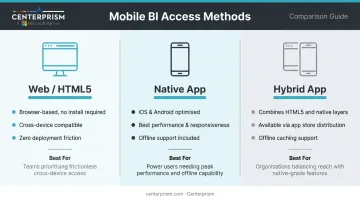
| Method | How It Works | Best For |
|---|---|---|
| Web/HTML5 | Browser-based, no installation required, works across device types | Broad access, lower development cost |
| Native App | Built specifically for iOS or Android; best performance and UX | Power users, offline requirements, device features (GPS, camera) |
| Hybrid App | Combines HTML5 with native capabilities; available via app stores | Balance of reach and functionality, including offline caching |
According to Mordor Intelligence, the global mobile BI market is projected to grow from $19.93 billion in 2025 to $66.28 billion by 2031 — a compound annual growth rate of 22.18%. For distributors and wholesalers evaluating ERP investments, that trajectory signals mobile access is becoming a baseline expectation, not a premium add-on.
Who Benefits Most
Three groups get the clearest return from mobile BI:
- Field sales reps who need live customer account data, order history, and pricing while they're on-site — not when they get back to a desk
- Executives reviewing live KPIs during travel or board meetings, without waiting on someone to pull a report
- Operations managers tracking inventory levels and order status directly from the warehouse floor
Business Intelligence in ERP: How They Work Together
Business intelligence within an ERP system is the analytical layer that transforms raw transactional data — orders, inventory levels, receivables, sales activity — into dashboards and reports that help managers make informed decisions. Without it, that data sits in tables that only IT can query.
Embedded BI vs. Standalone BI Tools
The difference between embedded BI and a standalone analytics tool comes down to where the data lives and how long it takes to get there.
With a standalone tool — think a separate analytics platform pulling from a data warehouse — you need an ETL pipeline to extract, transform, and load data from your ERP into a secondary database. That process introduces latency, maintenance overhead, and cost.
SAP's S/4HANA Embedded Analytics offers a useful illustration: its Virtual Data Model provides direct, real-time access to transactional data with no replication required. No warehouse, no wait.
Oracle defines embedded analytics as integrating data analysis capabilities into operational applications so users can analyze data without switching systems. That's the core value: analytics in context, not analytics in a separate tab.
What Mobile ERP Means
Mobile ERP extends this concept to operational tasks — not just viewing reports. A mobile ERP interface lets users check inventory, look up customer accounts, process transactions, and complete approvals from a phone or tablet. The goal is operational capability from anywhere, not just data visibility.
The 4 Pillars of Business Intelligence
These four components must work together for BI to deliver anything useful:
- Data Sourcing and Integration: Purchase orders, sales transactions, and customer records from all operational systems consolidate into a single source of truth.
- Data Storage: The ERP's own database handles fast querying — no separate warehouse required in an embedded setup.
- Data Analysis: Logic, metrics, and models surface what matters — margin trends, sales performance, and inventory movement for distributors and wholesalers.
- Data Visualization and Reporting: Dashboards, charts, and alerts translate findings into action — best-seller rankings, receivables aging, stock alerts.
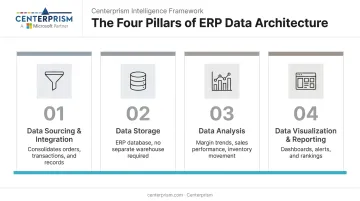
All four components depend on each other. The most polished dashboard is worthless if the underlying data is a day old — which is exactly why the integration between ERP and BI matters more than the interface itself.
Key Features of a Mobile BI Solution
The gap between a capable mobile BI solution and an underwhelming one comes down to a handful of specific features — not the feature count, but the architecture behind them.
Real-Time Data Access and Reporting
The most important architectural question is simple: does the solution query the live ERP database, or does it pull from a scheduled refresh?
If a sales rep checks a customer's credit status during a call and the data is four hours old, that information could create real problems. Real-time connectivity is the baseline requirement for any mobile BI solution in a distribution environment.
What to look for in mobile reporting:
- Interactive dashboards with touch-friendly drill-down, filter, and zoom controls
- KPI widgets that surface anomalies without requiring a user to hunt for them
- Push notifications triggered by threshold breaches — a customer hitting their credit limit, a stock level dropping below reorder point
Centerprism's PrismView analytics tool connects directly to the Microsoft Dynamics GP database — no separate data warehouse required. Distributors and wholesalers can view sales trends, best sellers, and profit margins without exporting to a spreadsheet.
Because PrismView needs no additional database infrastructure, it deploys same-day for organizations already running Dynamics GP.
Analytics and Decision Support
The right mobile BI solution goes further than dashboards — it should support the analysis that drives actual decisions:
- Navigate from summary views down to the individual transaction level to understand what's driving a number
- Slice data by salesperson, customer, product category, or vendor without waiting on IT
- Schedule report distribution to specific user groups, with role-based access so field reps see their data while managers see the full picture
PrismView's Field Chooser™ tool supports exactly this kind of flexible segmentation, allowing users to build custom views across items, customers, salespeople, and vendors without needing IT involvement.
Mobile BI Use Cases for Distributors and Wholesalers
Sales Rep Productivity
Salesforce research shows sales reps spend just 28% of the week actually selling — the rest goes to administrative tasks like data entry, status lookups, and deal management. Mobile BI directly attacks that problem.
A field rep walking into a customer meeting should be able to pull up:
- The customer's complete order history
- Current outstanding balance and payment status
- Real-time product availability
That information eliminates the "let me check with the office and call you back" conversation — and the deals that die during that delay.
Centerprism's integrated CRM is built directly into its ERP workflows, meaning customer relationship data and live analytics are part of the same system. Combined with PrismView's real-time database connection, a rep can access current customer data during a call without relying on a morning export or a colleague back at the office.
Inventory and Operations Management
NetSuite estimates that inventory carrying costs typically represent 20% to 30% of total inventory value. Visibility gaps — not knowing what's on hand, what's incoming, and what's running short — directly inflate those costs.
Centerprism's Wireless Warehouse Management solution gives warehouse and operations managers mobile access to real-time inventory data via a standard smartphone app, replacing the need for specialized handheld scanning devices. Mobile capabilities include:
- Scans barcodes for real-time stock tracking from any smartphone
- Updates inventory counts live as product moves through the warehouse
- Manages receiving, picking, and fulfillment workflows without returning to a desktop
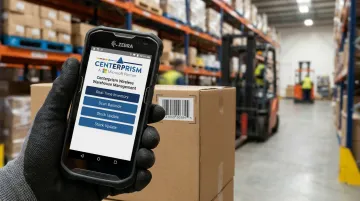
When a manager can identify a shortage from the warehouse floor rather than from a desktop report the following morning, reorder decisions happen faster and carrying costs stay tighter.
Collections and Accounts Receivable Management
The same visibility that tightens inventory management applies to cash flow. Receivables that sit unmanaged tie up working capital that could be moving product instead.
Finance managers and sales reps who can see overdue accounts in real time can prioritize collection calls based on actual aging, not a weekly report. Centerprism's Collections Management System tracks all customer communications and sends automated reminders for overdue accounts.
Custom status assignment lets teams sequence follow-up by priority — so the right accounts get attention first.
Centerprism's sliding commission depreciation scale automatically adjusts a salesperson's commission based on how long their customer's invoices remain unpaid. That creates a direct financial incentive for reps to stay engaged in collections from the field, not just at month-end review.
Benefits of Mobile BI in ERP Systems
Faster Decision-Making
Mobile BI compresses the time between data availability and action. Decisions that previously required waiting for a weekly report or an office visit can now happen in the field with live numbers. A rep who can see a customer's account status during a meeting closes deals in real time rather than sending a follow-up quote the next day.
Increased BI Adoption Across the Organization
BARC research shows that BI and analytics adoption rates remain stuck around 20% in most organizations. Most of that usage comes from office-based analysts — not the frontline workers who interact with customers and products every day.
Making analytics available on mobile devices changes that. Warehouse staff, drivers, and field reps who never opened a desktop BI tool will use a mobile app that surfaces the specific data they need, right when it matters.
Reduced Reliance on Manual Reporting
When BI is embedded in the ERP and accessible via mobile, employees stop building spreadsheets or waiting for IT to pull a report. APQC research confirms that highly manual financial reporting increases error rates and rework while raising labor costs.
For GP-based distributors and wholesalers, this is where a tool like PrismView makes a measurable difference. Because it connects directly to the live GP database rather than exporting to a separate file, the data is always current. Specifically, it eliminates:
- Manual spreadsheet builds for sales, inventory, or receivables reporting
- Lag time between when data changes and when managers see it
- Rework caused by stale exports or version-control issues
Challenges of Implementing Mobile Business Intelligence
Data Security on Mobile Devices
Verizon's 2024 Mobile Security Index reports that 53% of organizations experienced a security incident involving a mobile or IoT device that resulted in data loss or downtime. Mobile devices get lost, stolen, and left in rideshares.
Key safeguards to require in any mobile BI solution:
- Multi-factor authentication
- Data encryption in transit and at rest
- Remote wipe capability
- Role-based access controls that limit what each user can view or export
Poor UI Design for Small Screens
Porting a desktop BI dashboard to a mobile screen without redesigning it produces an interface that nobody uses. Effective mobile BI requires:
- Simplified navigation with large touch targets
- Prioritized KPIs rather than full data tables
- Purpose-built layouts that show what matters at a glance
If users have to pinch, scroll, and zoom to find a number, they'll stop opening the app.
No Mobile BI Strategy Before Implementation
Organizations that deploy mobile BI without first identifying which user groups need which data — and in what context — end up with low adoption and a hard-to-justify expense.
A phased rollout prevents this. The recommended approach for distributors:
- Start narrow: Identify the single highest-value use case — field sales visibility is the most common starting point
- Prove the model: Measure adoption and business impact before expanding
- Roll out by role: Add warehouse, operations, or finance users only after the first group is fully onboarded
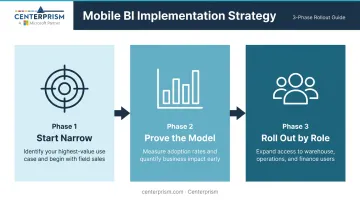
Skipping this sequence is the fastest route to an unused tool and a wasted budget.
Frequently Asked Questions
What is mobile business intelligence?
Mobile BI is the ability to access, analyze, and act on business data through smartphones and tablets in real time. It enables decision-making from any location rather than requiring users to be at a desktop or in the office.
What is business intelligence in ERP?
BI in an ERP is the analytical layer that transforms transactional data — orders, inventory, sales, receivables — into dashboards and reports. It allows managers to make informed decisions without pulling data into spreadsheets.
What is mobile ERP?
Mobile ERP is an ERP system accessible via smartphone or tablet, allowing users to perform operational tasks — checking inventory, processing orders, reviewing customer accounts — from any location. Unlike a read-only dashboard, it supports actual work in the field.
What are the 4 pillars of business intelligence?
The four pillars are Data Sourcing and Integration, Data Storage, Data Analysis, and Data Visualization and Reporting. Each layer builds on the last — without all four aligned, BI produces raw data instead of actionable insight.
What are the main benefits of mobile BI for distributors and wholesalers?
The top benefits are real-time sales and inventory visibility, faster collections management, and field rep access to customer account data during sales calls. All of this happens directly within the ERP system, no office call required.
What are the challenges of implementing mobile business intelligence?
The three main challenges are data security on mobile devices, building a UI that works on small screens, and defining a clear strategy before rollout. Skipping that last step is the most common reason adoption fails even when the technology is solid.