Introduction
Most distributors and wholesalers underestimate what a WMS implementation actually involves until they're already deep into it. The complexity scales fast: warehouse size, SKU volume, and the number of systems that need to connect — an ERP, an ecommerce platform, shipping carriers, multiple sales channels — each one adds new variables.
Most businesses assume the hard part is selecting the software. It isn't. The hard part is everything that comes after: cleaning your data, mapping your workflows, integrating your systems, training your staff, and keeping orders moving during a transition that cannot afford to go sideways.
This guide walks through the complete WMS implementation process, from pre-project planning through go-live and post-launch stabilization. It includes realistic cost considerations and the specific challenges distributors face around inventory accuracy, sales order integration, and real-time visibility.
Key Takeaways
- WMS implementation follows a defined sequence: planning, configuration, data migration, testing, training, and go-live — skipping phases creates predictable failures
- Data quality and requirements mapping must be resolved before implementation begins, not during
- The biggest risk factors are poor data going into migration and staff resistance after go-live
- Hidden costs like data cleanup, overtime, and post-launch fixes routinely exceed original budget estimates
- GP-based distributors should evaluate whether an integrated ERP like Centerprism removes the need for a standalone WMS project
What WMS Implementation Actually Involves
WMS implementation is the end-to-end process of deploying, configuring, integrating, and validating a warehouse management system within your existing operations. Purchasing the software is roughly 20% of the effort. The other 80% is workflow mapping, data migration, systems integration, user training, and change management.
For distributors and wholesalers specifically, the stakes are high. Research published in Production (2023) confirms that inventory record inaccuracy in distribution centers directly degrades picking productivity, drives lost sales, and increases operating costs. Inaccurate inventory doesn't just create warehouse problems — it erodes the sales team's ability to make reliable promises to customers.
The broader adoption picture adds important context:
- 87% of warehouses and DCs used a WMS in 2025, according to Modern Materials Handling's 2025 Warehouse/DC Operations Survey of 101 qualified respondents — yet 40% still used paper-based picking
- Cloud-based WMS adoption rose from 4% in 2024 to 13% in 2025, signaling accelerating momentum toward SaaS deployment
- For distributors managing sales teams alongside warehouse operations, a WMS alone won't close the visibility gap; real-time sales data, order status, and receivables information need to live in the same system
Before You Begin: Planning, Prerequisites, and Team Setup
Current-State Analysis First
Before a single line of software is configured, document your current warehouse workflows in detail: receiving, putaway, picking, packing, and shipping. Identify where errors occur, where time is lost, and what "success" looks like in measurable terms — pick accuracy rate, order cycle time, inventory shrinkage percentage. These become your post-implementation benchmarks.
Without baseline KPIs, you won't be able to demonstrate ROI. And without workflow documentation, you'll configure a system that automates the wrong processes.
Infrastructure and Data Prerequisites
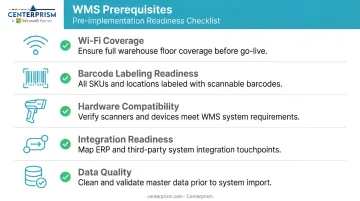
These must be verified before implementation starts, not discovered mid-project:
- Wi-Fi coverage throughout the full warehouse footprint, including receiving docks and high-rack areas
- Barcode labeling readiness — bin locations, SKUs, and receiving areas all labeled consistently
- Hardware compatibility — scanners, mobile devices, and thermal printers tested against the WMS
- Integration readiness — ERP, ecommerce, and shipping platform APIs identified and accessible
- Data quality — no duplicate SKUs, no unmapped locations, no inconsistent unit-of-measure data
Poor data quality is the most common reason WMS implementations stall. A peer-reviewed study in the International Journal of Computer Applications (2020) identified valid master data and business-volume data as core prerequisites for successful WMS implementation.
Team Structure
A functional implementation team includes five roles:
- Executive sponsor: owns the business case and clears organizational roadblocks when the project stalls
- Project manager — owns the timeline, tracks dependencies, escalates risks
- Warehouse operations lead: the person who confirms configured workflows actually match what happens on the floor
- IT or integration specialist — owns ERP and third-party system connections
- Floor-level super users: 2-3 experienced warehouse staff who learn the system first and build adoption from the ground up
The WMS vs. ERP Decision Point
Distributors and wholesalers who need integrated sales management, real-time analytics, and automated receivables alongside inventory control should ask one question before committing to a standalone WMS project: does a separate WMS actually solve your problem?
Centerprism, a full-spectrum ERP platform built on Microsoft Dynamics GP, addresses inventory control, sales management, receivables automation, and real-time analytics through a single integrated system. Its PrismView analytics tool connects directly to the GP database with no separate BI database required. For distributors already running Dynamics GP, this integrated approach can eliminate months of standalone WMS configuration entirely.
Whatever platform you choose, two prerequisites apply without exception:
- Do not begin implementation during peak season or an active inventory cycle count
- Do not proceed with known data quality issues — resolve them first
Step-by-Step WMS Implementation Roadmap
WMS implementation follows a defined sequence. Compressing or skipping phases — particularly testing and training — consistently produces the same result: a go-live that works in controlled conditions but breaks under real order volume on the warehouse floor.
Phase 1: Discovery and Scope Definition
Conduct a gap analysis between your current processes and the capabilities you need. Document every exception scenario, including:
- Partial shipments and returns processing
- Damaged goods handling
- Serial and lot number tracking workflows
These edge cases are exactly what untested systems fail on at go-live. They also create the most operational disruption when they surface unexpectedly.
Phase 2: System Configuration and Data Migration
Configure the WMS to reflect your physical warehouse layout: aisles, zones, bin locations, user roles, and picking workflows. Then comes data migration — the step where more implementations break down than most teams expect.
Data migration quality directly determines whether staff trust the opening inventory counts on day one. If the numbers are wrong from the start, floor staff will revert to manual processes and the WMS becomes shelf software.
Before cutover, complete these three steps:
- Cleanse naming conventions across your inventory master data
- Reconcile physical counts against system records
- Run a test migration to catch errors before they reach production
Phase 3: Integration Testing and User Acceptance Testing
Test every integration — ERP, ecommerce, shipping platforms — using realistic order volumes and your actual SKU catalog, not sample data. Connectivity tests alone don't find the problems that surface under real transaction loads.
Once integration testing passes, move directly into user acceptance testing with actual warehouse staff using the physical scanners and devices they'll use at go-live. Document every defect, fix it, and retest before moving forward. Skipping retest cycles is how defects get buried until day one.
Phase 4: Training, Pilot, and Go-Live
Train a cohort of super users first using a train-the-trainer model. Run a controlled pilot on a single product range or department before full rollout. At go-live, staff an on-site support team for the first two weeks and set conservative order volume targets.
On stabilization timelines, Deloitte's WMS implementation research (2023) provides the clearest guidance available:
| Process | Base Case | Complex Case |
|---|---|---|
| Inbound / put-away | ~2 weeks | ~4 weeks |
| Outbound / shipping | ~3 weeks | ~5 weeks |
| Inventory reconciliation | ~3 weeks | ~6 weeks |
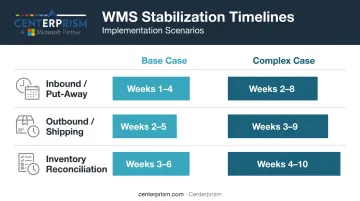
Deloitte also warns that setting an arbitrary full-capacity target — say, two weeks post-launch — drives user errors, inventory inaccuracies, and manual workarounds. Sequence your ramp-up to match actual stabilization rates, not an optimistic calendar date.
WMS Implementation Costs: Budget Ranges and Hidden Expenses
Primary Cost Categories
Every WMS implementation budget should account for four categories:
- Software licensing or SaaS subscription fees — cloud/SaaS models distribute cost over time; on-premise typically requires larger upfront capital
- Implementation services — vendor-provided or third-party consulting fees for configuration, integration, and go-live support
- Hardware — barcode scanners, thermal printers, mobile devices, and any network infrastructure upgrades
- Internal labor — the time your team spends on the project; this is real cost even when it doesn't appear on an invoice
Deposco (2025) and Extensiv (2026) both document that implementation costs extend well beyond subscription fees into integration setup, configuration, training, and ongoing support — costs that are easy to undercount during vendor evaluation.
Hidden and Variable Costs
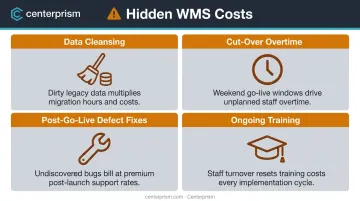
These are the line items that routinely blow WMS budgets:
- Data cleansing — the pre-migration work of deduplicating SKUs, standardizing naming conventions, and reconciling physical counts is consistently underestimated
- Cut-over overtime — the transition period typically requires significant additional labor hours
- Post-go-live defect fixes — configuration changes and integration repairs after launch carry both time and consulting costs
- Ongoing training — warehouse staff turnover means training is a recurring expense, not a one-time event
ROI Context
The strongest verified ROI data available comes from a Nucleus Research case study (2025): an international industrial parts distributor implementing Savant WMS achieved 204% ROI, a 6.0-month payback period, and $405,000 in annual labor cost avoidance. This is a specific vendor case — not an industry average — but it illustrates the potential return when implementation is executed well.
Cost-Control Levers
- Phase the rollout to distribute spend over time rather than absorbing all costs upfront
- Choose SaaS/cloud to convert capital expenditure into predictable monthly operating costs
- Invest in internal super users early to reduce ongoing consultant dependency
- Negotiate implementation scope to deliver critical functionality first, with additional features in later phases
Before go-live, establish baseline KPIs: inventory accuracy percentage, pick error rate, labor hours per order, and order cycle time. Without pre-implementation benchmarks, you cannot measure actual returns or make the business case for future investment.
Common WMS Implementation Challenges and How to Solve Them
Poor Data Quality at Migration
Problem: Inventory records contain duplicates, inconsistent SKU naming, or unmapped warehouse locations. The WMS opens on day one with inaccurate counts, and floor staff immediately lose confidence in the system.
Fix: Allocate dedicated time before migration for data cleansing. Standardize naming conventions, reconcile physical counts against system records, and run a test migration to identify errors before they reach production.
Staff Resistance to New Workflows
Problem: Warehouse staff revert to manual workarounds or skip scanning steps under pressure, creating inventory discrepancies that compound over weeks.
Fix: Involve floor staff in workflow design before configuration begins. Frame changes in role-specific terms — fewer pick errors means less rework, which resonates more than abstract promises of "better data for management." Use peer champions (super users from the floor itself) to reinforce new habits. Top-down mandates alone rarely hold.
A 2022 academic review published in the Journal of Mathematical and Computer Applications identifies employee resistance and insufficient training alongside data quality and integration readiness as the primary contributors to WMS implementation failures. Those same three factors — data quality, staff buy-in, and system integration — tend to interact. Fixing one while ignoring the others often shifts the problem rather than solving it.
Integration Failures Between WMS and ERP or Ecommerce Systems
Problem: Orders, inventory updates, or shipment confirmations fail to sync between systems. Manual reconciliation fills the gap, erasing the time savings the WMS was meant to provide.
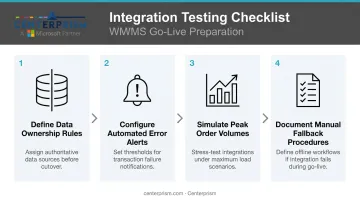
Fix: Before go-live, run integrations against real transaction volumes — not just basic connectivity checks. Key steps include:
- Define data ownership rules for each system (WMS vs. ERP vs. ecommerce platform)
- Configure automated error alerts so sync failures surface immediately
- Simulate peak order volumes to stress-test throughput before launch
- Document manual fallback procedures for the first 30 days post-go-live
WMS Implementation Best Practices
Plan for stabilization, not instant performance. Set conservative order volume targets for the first two to four weeks post-go-live and communicate realistic timelines to customers and internal stakeholders. Deloitte's research notes that inbound processes stabilize faster than outbound — use that sequencing to plan your capacity ramp.
Choose a system with real-time analytics built in. A WMS that requires a separate database or manual reporting exports creates an information lag that undermines the operational visibility you implemented the system to gain. For distributors managing both warehouse operations and sales teams, Centerprism's PrismView analytics connects directly to the existing GP database with no separate BI infrastructure and no spreadsheet exports. Operations and sales leadership work from the same live data, on the same platform.
Document everything during implementation. Post-go-live changes, staff onboarding, and system audits should not depend on institutional memory. Document each of the following before signing off at each phase gate:
- Workflows and exception handling rules
- User permissions and access levels
- Integration configurations and API settings
Don't implement during peak season. A WMS go-live during your highest-volume period compounds every stabilization challenge described above. Schedule your go-live for a predictably lower-volume period with enough runway before peak to reach full throughput.
Frequently Asked Questions
How do you implement a warehouse management system?
Assess your current processes and define measurable requirements, then select and configure the WMS, clean and migrate your data, test all integrations with real order scenarios, train staff, and execute a phased go-live. Budget 2-6 weeks of stabilization before reaching full operating capacity.
What are the main types of warehouse management systems?
The four primary types are standalone WMS, ERP-integrated WMS modules, cloud-based/SaaS WMS, and supply chain execution suites. Distributors and wholesalers typically benefit most from cloud-based or ERP-integrated solutions that connect inventory data to sales and financial management.
What are the five essential warehouse management processes?
Receiving, putaway, picking, packing/shipping, and inventory control (cycle counting). A WMS automates and tracks all five, replacing manual or spreadsheet-based management with real-time, scan-validated workflows.
Is SAP a WMS or an ERP?
SAP is primarily an ERP platform that includes a WMS module called SAP EWM. ERPs manage company-wide processes — finance, sales, procurement — while a WMS focuses specifically on warehouse operations. Modern ERPs increasingly integrate both functions.
How long does WMS implementation typically take?
Cloud-based systems for smaller operations typically take 4–12 weeks, according to vendor-stated timelines from Fishbowl and Deposco. Enterprise implementations with complex integrations can run 6–12 months. Testing and training phases are the most common place projects lose time.
What does WMS implementation typically cost?
Cloud-based WMS solutions typically range from $10,000 to $50,000 for small to mid-size operations; enterprise implementations can exceed $300,000. Vendor quotes often exclude data migration, cut-over overtime, and post-go-live support, so budget 20–30% above the initial estimate for those costs.